Last date modified: 2026-Apr-01
aiR for Data Breach Response
aiR for Data Breach Response is a Relativity product purpose-built to simplify and accelerate the process of identifying, extracting, and linking Personal Information (PI) and Personal Health Information (PHI) to the relevant individual or organization, and generating a consolidated list of impacted individuals using generative artificial intelligence (AI).
This product is available as a Relativity application (RAP) called aiR for Data Breach Response. The application can be installed into a RelativityOne Review workspace that runs within a RelativityOne production environment. The data used for analysis never leaves the RelativityOne security boundary, which aligns with security and compliance requirements defined in RelativityOne contracts.
- Input—Documents identified by a Saved Search to be analyzed by aiR for Data Breach Response
- Output—A notification report containing impacted individuals and their associated PI or PHI
See these related resources for more information:
- A Focus on Security and Privacy in Relativity’s Approach to Generative AI
- Six characteristics of Generative AI and their impact on aiR products
- Relativity aiR Ask the Expert: Generative AI Fundamentals in Relativity
Conceptual workflow
The steps below illustrate high level workflow steps for the aiR for Data Breach Response product
- Upload and process documents in your RelativityOne environment.
- Configure the aiR for Data Breach Response application into your environment and review workspace.
- Start a new Data Breach ingestion job and select the saved search of documents for review.
- Go to Settings and select PI and PHI detectors to use and add any custom detectors.
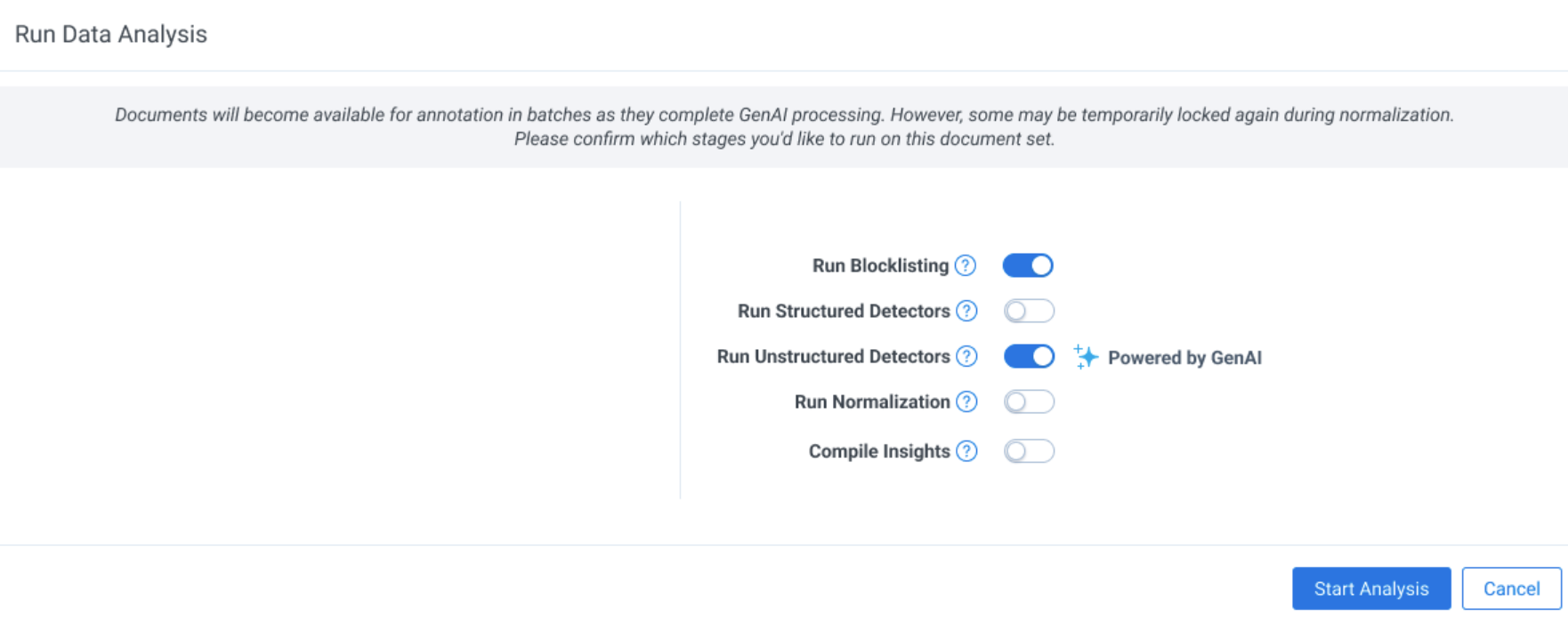
- Navigate to the Data Analysis tab and run Data Analysis. You will immediately start to get insights on identified, extracted, and linked PI and have the ability to review documents as PI detection completes. You can access documents ready for review on the project dashboard in real time. If the normalizer step is run the entity report is also automatically generated.
- Access the Project Dashboard to view PI and PHI identification, extraction, linking, and any document errors across the document set.
- Review the Entity Analysis tab to resolve conflicts and finalize your desired output.
Document requirements
Following are document requirements for aiR for Data Breach Response:
- aiR for Data Breach Response can support up to 300M personal information annotations and 150M entities, represented across 1 TB of native data in an aiR for Data Breach Response workspace.There is a document quota within an aiR for Data Breach Response workspace to ensure best performance of the analysis. This is tracked in the Ingestion tab. You can process a larger volume of documents by running them in increments, scaling up until you reach the full quota available.
- Extracted text files should be provided for all document types. This means that any information contained in metadata, images, or other non-text elements that are not visible in the extracted text will not be considered during PI identification, extraction, and linking.You can OCR in RelativityOne. See OCR for instructions.
- The following document types are not supported:
- Documents that open with an error or warning
- Excel files older than Excel 95 (v 7.0)
- Native spreadsheets greater than 40MB native size
- Native non-spreadsheets greater than 75MB native or 10MB extracted text size
Unstructured and Structured documents
aiR for Data Breach Response categorizes documents as either Unstructured or Structured. aiR for Data Breach Response leverages different AI-based methods to deliver the most efficient process for each type of document.
- Unstructured documents—contain unlabeled or otherwise unorganized data. The content on the files are usually composed of natural language. Examples of unstructured documents include text-based documents such as emails, word processing documents, and forms with additional unstructured data sources such as photos, and audio files. aiR for Data Breach Response uses the context of the document to differentiate different types of PI. aiR automatically identifies and links PI across unstructured documents, accelerating both the review and quality control processes. aiR for Data Breach Response also normalizes entities across documents and generates a consolidated notification list, helping you meet mandated response timelines.
To review Unstructured documents, see Unstructured document review. - Structured documents—contain data that is organized in a specific and predefined way, typically in a table with columns and rows where each data point has a specific data type. Examples of structured documents include spreadsheets and CSV files. aiR for Data Breach Response identifies table boundaries and detects header & column content to predict PI. For structured documents, the workflow relies on table detection and analysis of column headers and values to drive accurate and consistent extraction.
To review Structured documents, see Structured document review.
Supported file types
The following types of structured and unstructured documents are supported:
| Document type | Supported extensions | Limitations and notes |
|---|---|---|
| Unstructured documents |
.ppt, .pptx, .pptm, .doc, .docx , .txt , .eml, .msg, .mht, .svg, .pdf, .fdf, .xfdf, .pub, .dwg, .dxf, .dgn, .rvt, .dwf, .odt, .odp, .rtf, .wpf, .bmp, .jpg, .jpeg, .png, .wmf, .emf, .gif, .hdp, .jp2, .jpc, .tif, .tiff, .xps, .oxps, .xml, .xod, .xaml, .vcf |
Embedded documents are not supported. Extracted text is leveraged for emails, so formatting may be lost.
|
| Structured documents |
.csv, .tsv, .xls, .xlsx, .xlsm, .xlt, .xltm, .xltx, .xlsb |
CSVs must be delimited by comma. No other delimiter is supported. TSVs must be delimited by tab. No other delimiter is supported. |
Considerations
aiR for Data Breach Response harnesses the power of large language models (LLM) to review documents. While these technologies are powerful, they also come with limitations. It’s important that you understand these limitations and use the product with appropriate care.
All aiR for Data Breach Response outputs should be reviewed by a human. There are known risks that the AI may:
- Omit critical information, such as Personal Information (PI) or Protected Health Information (PHI)
- Incorrectly identify non-personal data as PI
- Flag documents as containing PI when they do not—or fail to flag documents that do
- Mislabel or miscategorize data
- Fabricate PI that does not actually exist in the source document
Shared LLM resources
LLM services are integrated across various Relativity products within the operational geography/ RelOne instance. For optimal results, it is highly recommended to utilize a single AI-based tool at any given time.
Security and privacy
Azure OpenAI does not retain any data from the documents being analyzed. Data you submit for processing by Azure OpenAI is not retained beyond your organization’s instance, nor is it used to train any other generative AI models from Relativity, Microsoft, or any other third party. For more information, see the white paper A Focus on Security and Privacy in Relativity’s Approach to Generative AI.
Regional availability of aiR for Data Breach Response
The availability of aiR for Data Breach Response varies by region.
The following table shows the regions in which aiR for Data Breach Response is currently available:
|
Region |
Current LLM Model |
|---|---|
|
United States |
GPT-4.1 mini |
|
United Kingdom |
GPT-4.1 mini |
| Australia | GPT-4.1 mini |
|
Canada |
GPT-4.1 mini |
|
Switzerland |
GPT-4.1 mini |
| EU Data Zone | GPT-4.1 mini |
Deployment and processing geographies
When using Relativity's AI technology, customer data may be processed outside of your designated geographic region. For more information, see Deployment and processing geographies.
Language support in aiR for Data Breach Response
aiR for Data Breach Response has been primarily tested on English-language documents. Accuracy is not guaranteed to be equivalent for other languages. However, the LLM is language agnostic and therefore supports global languages.
For the study used to evaluate Azure OpenAI's GPT-4 model across languages, see MEGAVERSE: Benchmarking Large Language Models Across Languages, Modalities, Models and Tasks on the arXiv website.
Running aiR for Data Breach Response
To run aiR for Data Breach Response:
- Before running the first ingestion job, navigate to Settings and make sure GenAI Mode is toggled on in your workspace.GenAI Mode can only be enabled for workspaces that have never run aiR for Data Breach Response before. Existing workspaces that have already started running jobs with aiR for Data Breach Response cannot be converted.
- Select other settings as usual and Save.
- Proceed to Data Analysis as usual and start running the processes. Generative AI will run as part of the Unstructured Detection pipeline step.

- There is a quota for how many unstructured docs can be run through aiR. This quota is listed and tracked in the Ingestion tab. See Unstructured document review for more details. Existing document size and scale limitations for structured documents apply.
- You can continue to run custom detectors as usual. Customer detectors are not currently run through aiR and therefore will not be autolinked to names as the aiR detectors are.
- In the viewer you will notice a sparkle icon for all aiR generated entities on the Linked Entities panel.
You can directly edit linked entities and PI types.
Personal Information detectors
To view a list of out of the box Personal Information detectors supported by aiR for Data Breach Response, see Supported Personal Information detectors.
On this page
- aiR for Data Breach Response
- Conceptual workflow
- Document requirements
- Unstructured and Structured documents
- Considerations
- Shared LLM resources
- Security and privacy
- Regional availability of aiR for Data Breach Response
- Deployment and processing geographies
- Language support in aiR for Data Breach Response
- Running aiR for Data Breach Response
- Personal Information detectors