Last date modified: 2026-Mar-03

RelativityOne FOIA (Advance Access)

Advance Access (AA) is an opportunity to evaluate and work with Relativity features prior to the General Availability (GA) release. Relativity customers typically participate in AA programs on a feature-by-feature basis. The functionality described in this topic may not be available in all Relativity environments. This topic may not represent the functionality, appearance, or behavior of the GA release version of this feature.

RelativityOne FOIA is currently in advance access and is planned for general release in mid-2026.

The Freedom of Information Act (FOIA) is a federal law that gives the public the right to request access to records from government agencies, promoting transparency and accountability. RelativityOne Government is being modernized to help agencies manage the entire FOIA process with a modular, AI-powered ecosystem that streamlines intake, tracking, review, publication, and reporting. By integrating secure infrastructure and automated tools, RelativityOne FOIA enables agencies to efficiently process requests, apply statutory exemptions, and maintain oversight throughout the FOIA life cycle.

Table of Contents

Home

Agency portals Public portal Agency administration
    FOIA Portal

Public and agency portals

Relativity supports FOIA operations through two portals: a public-facing FOIA Portal and the agency-only RelativityOne FOIA environment. Public access to the FOIA Portal is provided through the government-managed authentication service, Login.gov. Agency users access FOIA functionality directly through RelativityOne. The FOIA Portal is fully integrated with RelativityOne to ensure a seamless experience.

FOIA Portal

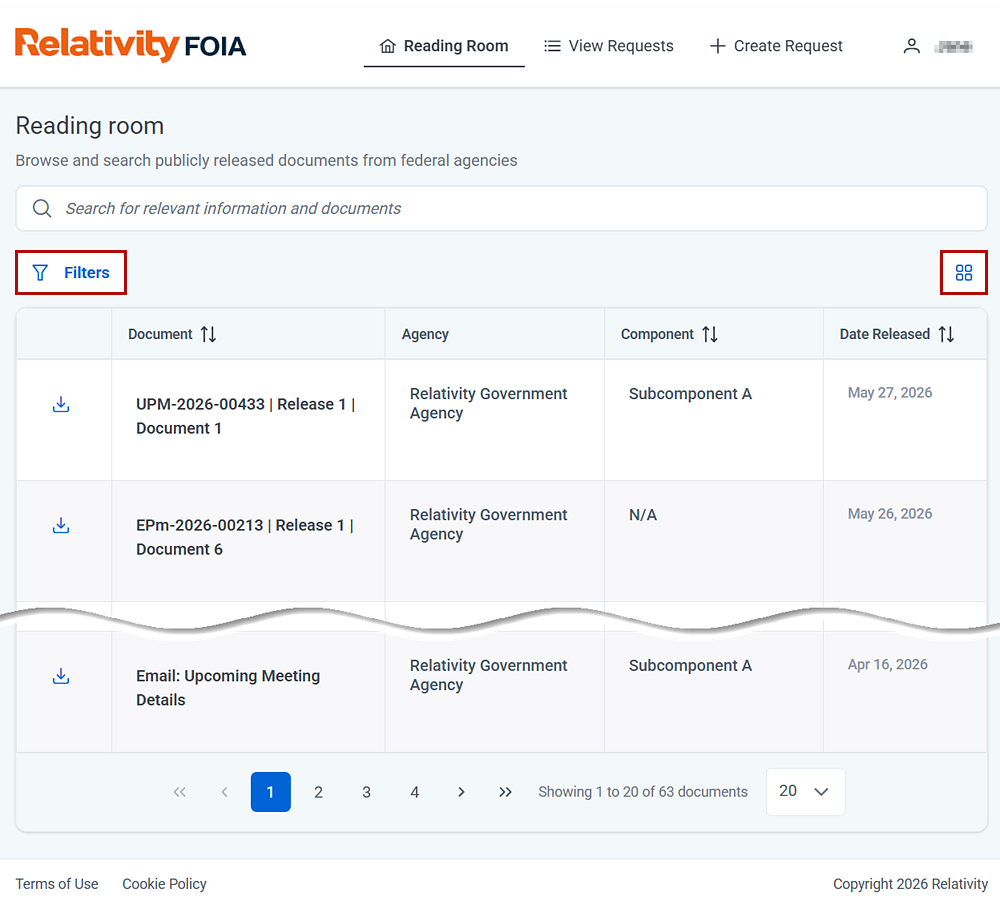
The FOIA Portal is the public-facing interface that allows users to view released documents, submit new FOIA requests, pay applicable fees, and track request status. It integrates seamlessly with agency systems, creating a unified and efficient communication channel between public users and agencies.

Significant features include:

  • Reading Room—search, read, and download released documents.
  • View Requests—track the status of requests.
  • Create Request—submit new FOIA requests (available in GA).
    The Reading Room is where you can find released documents, and submit new requests for documents.

See FOIA Portal for expanded details on the portal's features.

RelativityOne FOIA

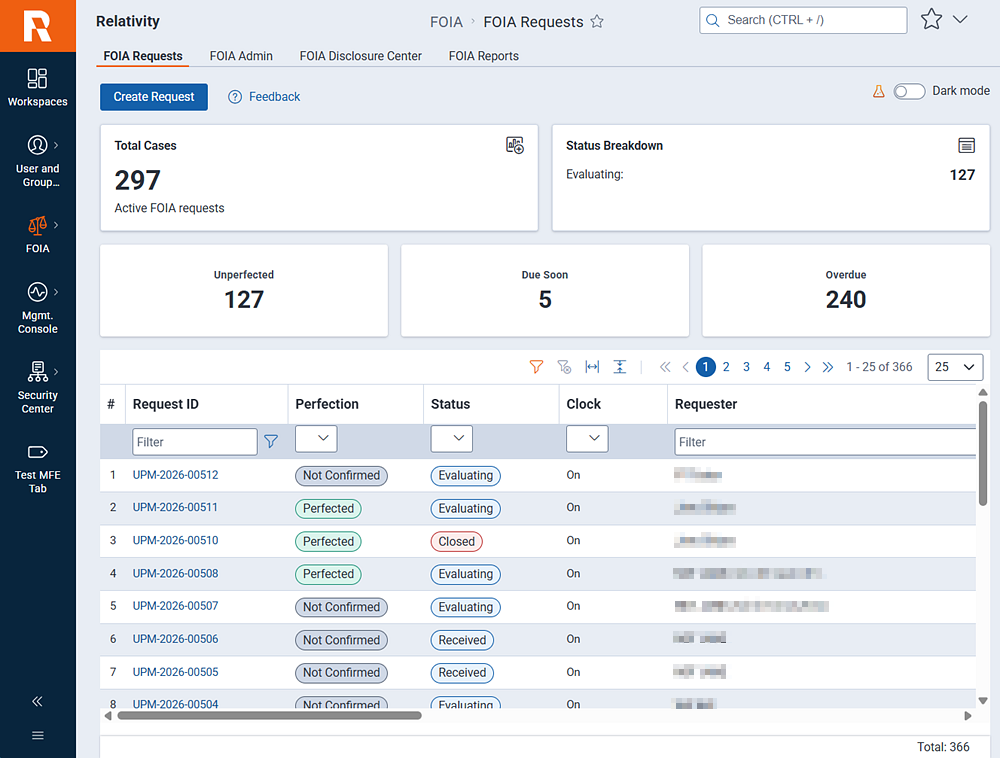
RelativityOne FOIA is the agency access point for receiving, searching reviewing, and responding to FOIA requests. Access this portal through the FOIA sidebar menu > FOIA Requests option. The FOIA screen features a dashboard display of request statistics, along with a list of recently submitted requests. You can drill-down into requests for further Intake, Search, Review, and Respond.

RelativityOne FOIA portal for agency access.

Dashboard widgets:

  • Total Cases—the total number of active FOIA requests.
  • Status Breakdown—current number of requests under evaluation, in processing, and waiting for a response.
  • Unperfected—the number of requests that are under review or not complete.
  • Reassignment—the number of requests reassigned to another agency.
  • Due soon—the number of requests that are reaching the end of the allotted time frame for processing.
  • Overdue—the number of requests that have passed the allotted time frame for processing.
  • Pending—the number of requests under review.

List fields: (the full list of field descriptions will be available in GA)

  • Request ID—the unique identifier assigned to the request.
  • Perfection—indicates if the request is complete and meets the requirements of the agency. A non-perfected status indicates the review is not complete or more information is required to process the request.
  • Status—the current status of the request.
  • Clock—indicates if the clock is running. Relativity follows DOJ rules for starting and stopping the clock. The clock starts when the request is received. If the request is not perfected, then the clock is stopped until perfection is achieved. After perfection, the clock starts again.
  • Requester—the person submitting the FOIA request.
  • Assigned Office—the office or agency assigned by the reviewer to search for and provide documents.
  • Date Submitted—the date the request was submitted.

FOIA Workflow

The FOIA process begins with a request for documents. Once the request is received, the RelativityOne FOIA workflow starts with the Intake step. In all, there are four steps to the workflow:

  • Intake—begins after a document request is received. The agency reviews the request and decides if it passes FOIA submission policies. The response clock begins when the request is received.
  • Search—if the request is perfected (all of the FOIA submission guidelines are met), agencies then locate records that are responsive to the request.
  • Review—during this phase, agencies assess the records to determine the appropriate level of release (such as partially or fully released) in accordance with legal requirements.
  • Respond—in this final step, agencies deliver the records to the customer. The response clock stops.

Permissions

To access the FOIA application, a system administrator must grant the appropriate permissions. FOIA permissions are configured under Instance Details > Manage Permissions > Features. Verify that at least one group within your RelativityOne instance has been assigned permissions for the FOIA application and its associated tabs.
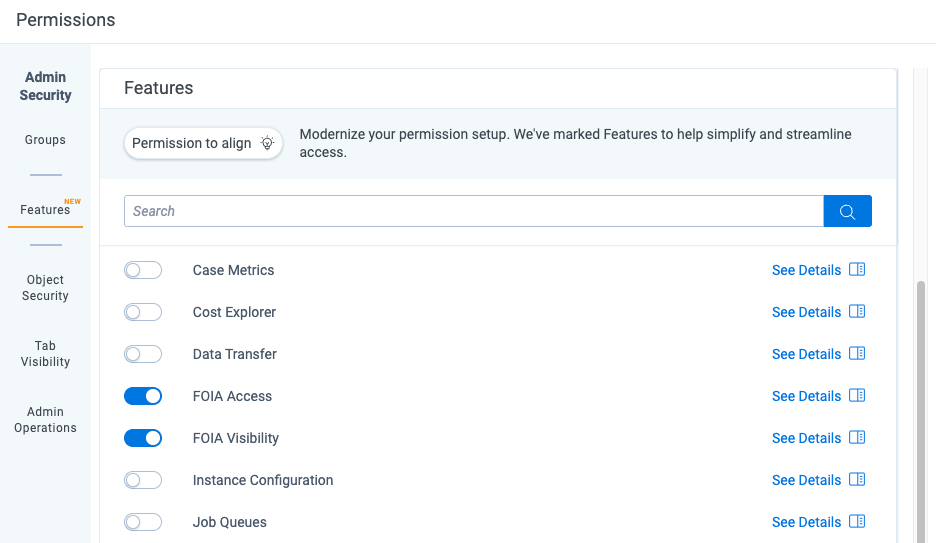
The permissions screen showing foia access and foia visibility active.

Getting started in AA

Begin by navigating to the Intake topic. Relativity will provide you with sample requests that you can use in a mock workflow.

Return to top of the page
Feedback