Last date modified: 2026-May-08

Permissions (Advanced Access)

Advance Access (AA) is an opportunity to evaluate and work with Relativity features prior to the General Availability (GA) release. Relativity customers typically participate in AA programs on a feature-by-feature basis. The functionality described in this topic may not be available in all Relativity environments. This topic may not represent the functionality, appearance, or behavior of the GA release version of this feature.

System administrators can control access to aiR Assist per group within a workspace using Features Permissions for Index Management, Prompting, and Access Management. This is helpful when different teams are responsible for different tasks, such as only using indexing or only asking questions. See Feature permissions and Setting workspace permissions for more information.

aiR Assist permissions set within a workspace will not be retained when restoring the workspace from an archive using ARM.

Below are some typical scenarios, along with the appropriate permission toggle settings:

  • Group A can manage indexes, ask questions/prompts, and manage their conversations: Index Management=ON, Prompting=ON, and Access Management=OFF.
  • Group B is only responsible for creating, rebuilding, and deleting indexes via Index Manager: Index Management=ON, Prompting=OFF, and Access Management=OFF.
  • Group C is only responsible for asking questions (prompting) as well as managing their conversations: Index Management=OFF, Prompting=ON, and Access Management=OFF.
  • Group D is only responsible for setting up permissions for other user groups and cannot use any aiR Assist functionality: Index Management=OFF, Prompting=OFF, and Access Management=ON.

Use the steps below to set feature permissions per group within a workspace:

  1. Navigate to Workspace Details within the Admin tab.
  2. Click Manage Workspace Permissions in the Relativity Utilities console.
  3. Click the Features tab.
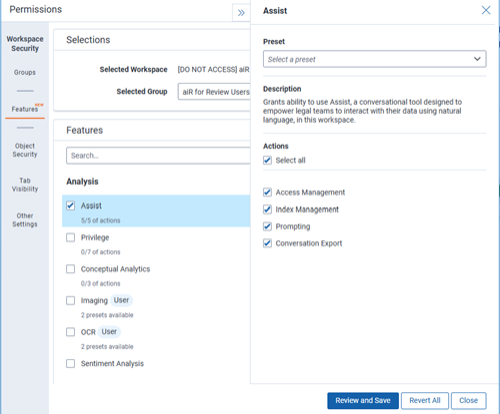
    Features tab within Workspace Security Permissions showing aiR Assist permissions
  4. Set the aiR Assist permissions as needed for the group:
    When both Index Management and Prompting permissions are disabled, aiR Assist will not appear within the group's workspace. If at least one of these permissions is enabled, aiR Assist will appear.
    • Access Management—Toggle this setting ON to allow group members the ability to assign and manage the Index Management and Prompting permissions for other groups in the workspace. If no additional aiR Assist permissions are enabled for the group, aiR Assist will not display to them within RelativityOne.
      Given the advanced nature of this setting and its impact on group permission assignment, it is recommended that System Administrators enable it for select groups only.
    • Index Management—Toggle this setting ON to allow group members to use the Index Manager to create, rebuild, and delete indexes and use metadata mapping in the workspace. If this is the only permission toggled on for the group, users will not be able to ask questions/prompts or start and manage conversations.
    • Prompting—Toggle this setting ON to allow group members to ask questions/prompts about documents in the workspace within created indexes. Users will also be able to use Conversation Manager to create, edit, and delete their conversations.
  5. Click Review and Save to review the unsaved changes. For more information, see Setting workspace permissions.
  6. Click Save.
Return to top of the page
Feedback