


Feedback

Last date modified: 2026-Jun-25
A grouped collection means that all conversations for the selected custodians are combined into a single set of RSMF output files.
This approach is used to:
If each custodian were collected separately, any shared conversations, such as direct messages, group chats, or shared channel content, would be collected multiple times. This would:
Within Collect, there are short message data sources that Relativity collects in a grouped format when more than one custodian is selected.
Grouped collection data sources:
Grouping ensures that shared content is collected once. This helps reduce duplicates and keeps the dataset consistent.
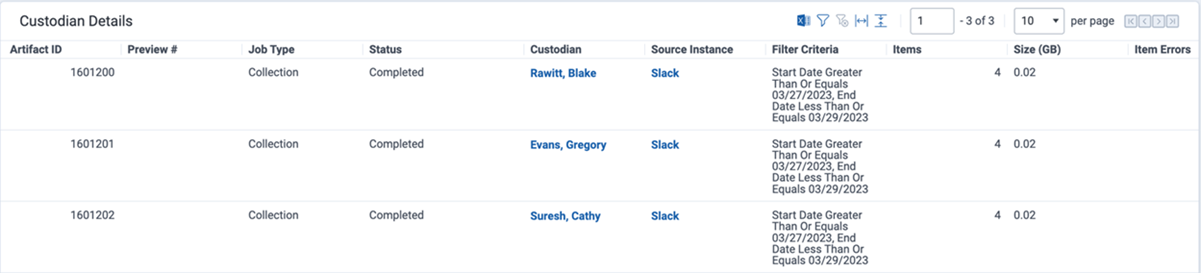
When viewing grouped collection results on the Collect job details page, the reported artifacts collected and collection size show the same value for all involved custodians. This reflects that there is one collection of RSMFs containing all chats for the collected custodians.
The reported Items collected is the number of RSMF files that were generated during the collection. We currently do not support reporting the number of individual messages attributable to each custodian independently. The reported Size (GB) represents the aggregate size of all generated RSMF files.
Grouped collections create a limitation during processing because the Processing capability supports only one custodian per processing set data source.
Relativity assigns an Entity representing the data source as the custodian for the processing set when using auto-processing or the Create Processing Job (on-demand) feature in Collect.
This prevents the system from applying a single custodian to the entire RSMF dataset, which would incorrectly suggest all messages belong to one person.
When manually creating a processing set, you encounter the same limitation of needing to assign a single custodian to the grouped RSMF data.
Recommended approach:
Example: Slack – Acme Matter – 2026-02-10
This approach accurately reflects that the data set represents multiple custodians and maintains consistency with Collect’s automated processing behavior.
