


Feedback

Last date modified: 2026-Sep-21
Use PI and Entity Search to query documents analyzed by Data Breach Response. This query option is available in workspaces where the Data Breach Response application is installed and lets you search fields specific to that application. Unlike Keyword and dtSearch, PI and Entity Search targets fields related to personal information detection, entity identification, and data breach review workflows.
With PI and Entity Search, you can search for:
To create a search query:
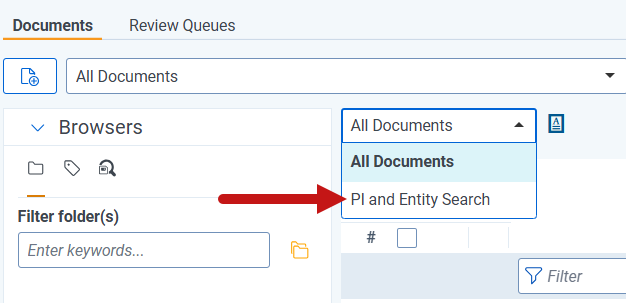
You can save PI and Entity Search queries as a saved search. These saved searches can be used as building blocks in other Relativity features, such as creating batches or using Review Center. For instructions, see Creating and editing batch sets and Review Center.
You can search for the following fields using PI and Entity Search.
| Name | Description |
|---|---|
| Batch ID | The batch a document is assigned to. |
| Data Analysis Status |
The Data Analysis processing status of a document. Searchable values include:
|
| Date Added | The date the document was added. |
| Date Last Updated | The date the document was last updated. |
| Document Categories | The categories applied to a document. |
| Document Flags | User-created or system-created flags applied to a document. |
| Document ID | The unique ID number assigned to a document. |
| Duplicate Of | The document ID of the document this record is a duplicate of. |
| Entity Count | The number of breached entities identified on a document. |
| Is Duplicate | Whether the document was identified as a duplicate. |
| PI Count | The number of PI instances found on a document. You can also use this field to query the count of specific PI types on a document. |
| PI Types | The PI types identified on a document. |
| Reviewed Status | Whether a document is locked or unlocked. |
| Unable to Map PI to Viewer | Whether PI could not be mapped to the viewer — for example, on poorly OCR'd documents. |
You can use the following operators to formulate custom search queries with PI and Entity Search.
| Operator | Description |
|---|---|
| CONTAINS | Compares two values to see if the value on the left contains the value on the right. |
| = | Compares two values to determine if they are equal. |
| != | Compares two values to determine if they are not equal, returns true if not equal. |
| < | Compares two values to see if the value on the left is less than the value on the right. |
| <= | Compares two values to see if the value on the left is less than or equal to the value on the right. |
| > | Compares two values to see if the value on the left is greater than the value on the right. |
| >= | Compares two values to see if the value on the left is greater than or equal to the value on the right. |
| AND | Compares two values and returns true if both conditions are satisfied. |
Following are examples of common search strings.
Enclose field names and values in single quotes in your query.
| Syntax pattern | Example | Description |
|---|---|---|
| CONTAINS PI | CONTAINS PI | Returns documents that contain at least one piece of PI. |
| CONTAINS DATA BREACH ENTITY | CONTAINS DATA BREACH ENTITY | Returns documents that contain at least one breached entity. |
| CONTAINS PI TYPE '<PI type>' | CONTAINS PI TYPE 'U.S. Social Security Number' | Returns documents that contain the specified PI type. |
| CONTAINS PI TYPE '<detector\'s name>' | CONTAINS PI TYPE 'Driver\'s license' |
Returns documents that contain PI for a detector whose name includes special characters.
Use \ to escape the special character.
|
| '<Field Name>' CONTAINS '<Value>' | 'PI Types' CONTAINS 'Phone Number' | Returns documents where the specified field contains the value. |
| '<Field Name>' = <Value> | 'Is Duplicate' = true | Returns documents where the field matches the specified value. |
| '<Field Name>' != '<Value>' | 'PI Types' != 'Patient ID' | Returns documents where the field does not match the specified value. |
| '<Field Name>' < <Value> | 'Entity Count' < 3 | Returns documents where the field value is less than the specified number. |
| '<Field Name>' <= <Value> | 'PI Count' <= 10 | Returns documents where the field value is less than or equal to the specified number. |
| '<Field Name>' > <Value> | 'PI Count' > 10 | Returns documents where the field value is greater than the specified number. |
| '<Field Name>' >= <Value> | 'Entity Count' >= 1 | Returns documents where the field value is greater than or equal to the specified number. |
