Configuring notifications for an ARM job
You can configure who is notified about an ARM Archive or Restore job in the Notification section of the job form. Notifications apply per job, so each job can have its own recipients.
Considerations
Consider the following before setting notifications:
- Per-job configuration—notification settings apply only to the job you configure them on. Each new job starts with the default toggle state and must be configured individually.
- External recipients—addresses added in the Additional Recipients field do not need to be Relativity aiR users. This option can be useful for notifying customer contacts or operations teams without granting them access to ARM.
- API jobs—if you create ARM jobs through the API, notification settings are included as part of the job request. See the ARM API documentation for the expected format.
Setting notifications
Two toggles control who receives email notifications:
- Notify Job Runner—sends notifications to the user who created the job and to the user who runs it. When the creator and the executor are the same user, only one notification is sent.
- Notify Additional Recipients—sends notifications to one or more additional email addresses that you specify on the job.
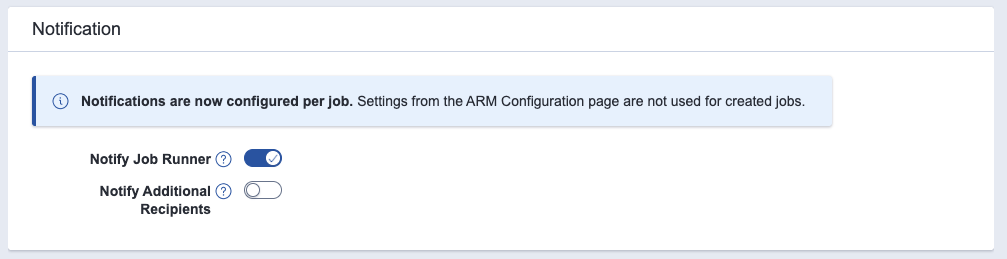
For jobs that are created and executed by an automation or service account, turn off Notify Job Runner if you do not want notifications to go to that account. Instead, use Notify Additional Recipients to send notifications to a person or distribution list.
Notifying additional recipients
Turn on Notify Additional Recipients to send notifications to email addresses that are not the job runner. Recipients can be Relativity users, internal distribution lists, or external client contacts.
When the toggle is on, Additional Recipients field appears.
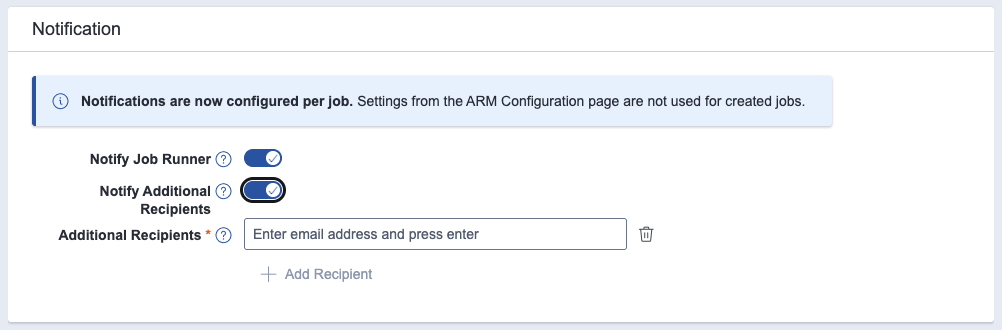
To add a recipient:
- Click in the Additional Recipients field and type an email address.
- Press Enter to confirm the address.
- To add another recipient, click + Add Recipient and repeat.
- To remove a recipient, click the trash icon next to it.
You can add up to five additional recipients per job. After the limit is reached, the + Add Recipient action is disabled. To add a different recipient, remove one of the existing entries first.
Notification types
When you enable notifications with either toggle, ARM sends an email to each recipient for the following job lifecycle events:
- Job started—sent when the job execution has been requested.
- Job paused—sent when the job has been paused by a user or by the system.
- Job canceled—sent when the job has been canceled before completion.
- Job completed successfully—sent when the job has finished without errors.
- Job failed—sent when the job has stopped because of an error.
- Workspace visible—sent when the restored workspace has become accessible to users in Relativity aiR. Applies to Restore jobs.
- Job resumed—sent when the job has been resumed after being paused.


