Last date modified: 2026-Nov-04
Structured analytics permissions
This page contains information on the security permissions required for working with structured analytics.
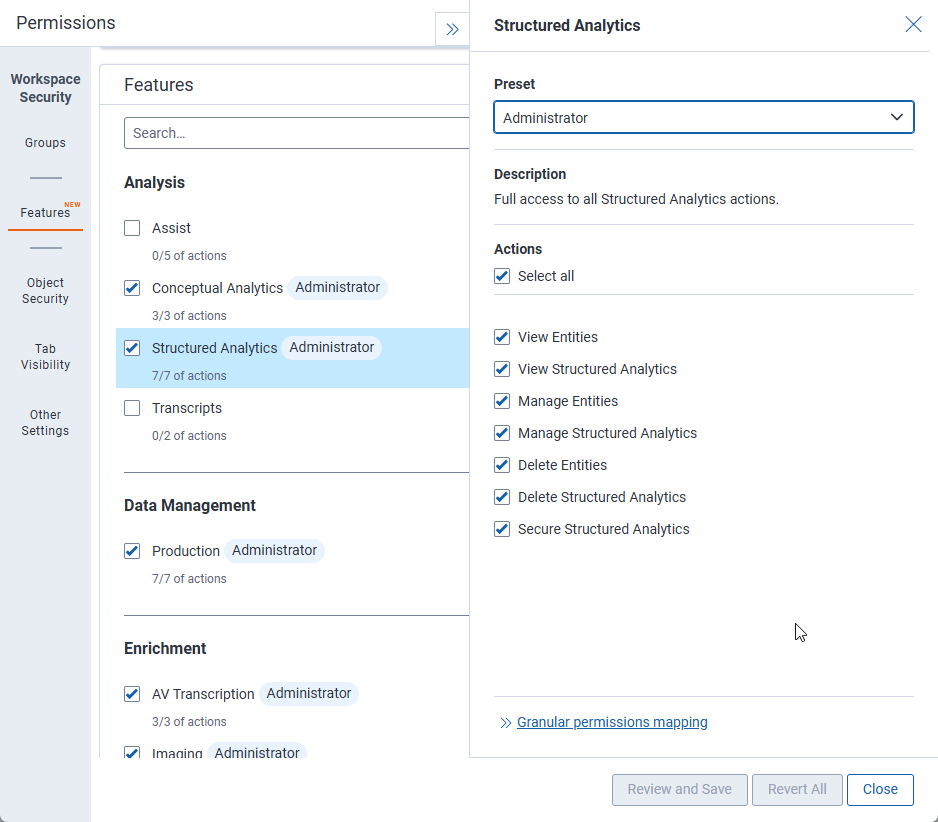
Feature permissions
Permissions for Structured Analytics include:
- View Entities—select to allow users to view aliases and entities.
- View Structured Analytics—select to allow users to view structured analytics sets, tabs, and profiles. This also gives access to:
- Email thread visualization
- Repeated content filters
- The communication analysis widget
- Manage Entities—select to allow users to view, create, and edit aliases and entities. This also gives access to the Assign to Entity mass operation.
- Manage Structured Analytics—select to allow users to view, create, and edit structured analytics sets, tabs, and profiles. This also gives access to:
- Email thread visualization
- Repeated content filters
- The communication analysis widget
- Color Map
- Delete Entities—select to allow users to view, edit, and delete aliases and entities. This also gives access to the Merge mass operation.
- Delete Structured Analytics—select to allow users to view, edit, and delete structured analytics sets, tabs, and profiles. This also gives access to:
- Repeated content filters
- Color Map
- Secure Structured Analytics—select to allow users to secure objects used for structured analytics. This includes aliases, entities, structured analytics sets, and analytics profiles. This also gives access to:
- Repeated content filters
- Color Map
For more detailed information on what is included in each permission, see Workspace-level permissions.
If you are assigning granular permissions for structured analytics sets, instead of using feature permissions, assign these to the user group.
Working with structured analytics
Using structured analytics requires the following permissions:
| Object Security | Tab Visibility | Other Settings |
|---|---|---|
|
|
|
Viewing email thread visualization
Email thread visualization requires the following permissions:
| Object Security | Admin Operations |
|---|---|
|
|
You must also have View permissions to the following fields:
- Email Action
- Email Thread Group
- Email Author Date ID
- Inclusive Email
- Email Thread Hash
- Email Duplicate Spare
- Email Threading Display
Adding a communication analysis widget
The following permissions are required for adding a communication analysis widget to a dashboard:
| Object Security | Tab Visibility | Other Settings | Item-level Security |
|---|---|---|---|
|
|
|
|