


Feedback

Next Gen Identity Server should not be deployed during EA except for customers participating in the beta program.
Relativity Server 2026 introduces a major upgrade to the underlying identity server architecture. The authentication experience for users remains familiar. However, the Next Gen Identity Server is now a distinct component. You must install, verify, and enable it in your environment.
In short: same sign-in experience for users - new deployment step for administrators.
Historically, authentication in Relativity was part of the platform and required little customer action. In Server 2026, the Next Gen Identity Server is a separate component that must be explicitly installed, verified, and enabled in your environment before it becomes active.
For Early Access (EA), you install the Next Gen Identity Server once per environment, on a single dedicated IIS server - the Identity Server host. Do not install it on every Relativity web server, and do not install it on the SQL Server or the Relativity primary/web-application server. The EA release supports single-server deployment only; all EA testing, documentation, and support guidance is based on this topology. Multi-server high-availability deployment will be available for GA.
This document provides a high-level overview of what is changing and how the Next Gen Identity Server fits into the Relativity environment. It covers what to expect when planning deployment and adoption.
This overview targets administrators, architects, customer IT teams, support engineers, integrators, and technical decision-makers. It covers the deployment model and key authentication concepts. It also highlights differences from the legacy identity model.
Companion documentation covers detailed installation steps, operational procedures, post-installation verification, and troubleshooting guidance.
The Next Gen Identity Server is Relativity's authentication and authorization service for Relativity Server 2026. It is built on IdentityServer 7. It runs as an ASP.NET Core 10 application hosted under IIS. It handles user sign-in, session management, and sign-out. When configured, it coordinates with external identity providers. The service runs as an IIS application under the Default Web Site.
Prior to Relativity Server 2026, IdentityServer3 is embedded in the Relativity web tier. It is not deployed as a separate identity service. Users access their normal Relativity address. When authentication is required, Relativity redirects them to the built-in identity component. After successful authentication, users return to the application. Session and identity management happen within the same Relativity application process.
Starting with Server 2026, Relativity is moving from IdentityServer3 to the Next Gen Identity Server. The new server uses a modern, commercially supported foundation. Technology factors and customer needs drive this change:
The Next Gen Identity Server is hosted in IIS and works alongside Relativity. It installs on the Identity Server host, which is separate from the Relativity web application server. The identity service handles authentication requests, credential validation, and session management. The main Relativity application continues to handle business logic and features.
The service is deployed as the /RIS application under the Default Web Site. It is reachable at https://[domainname]/RIS. It connects to the EDDS database and Relativity Secret Store at runtime. No plain-text credentials are stored in configuration files.
For EA, the Next Gen Identity Server runs on a single Identity Server host rather than on every Relativity web server - this avoids requiring load-balancer support in the EA release. Multi-server high-availability deployment will be available for GA.
Figure 1. Layered architecture
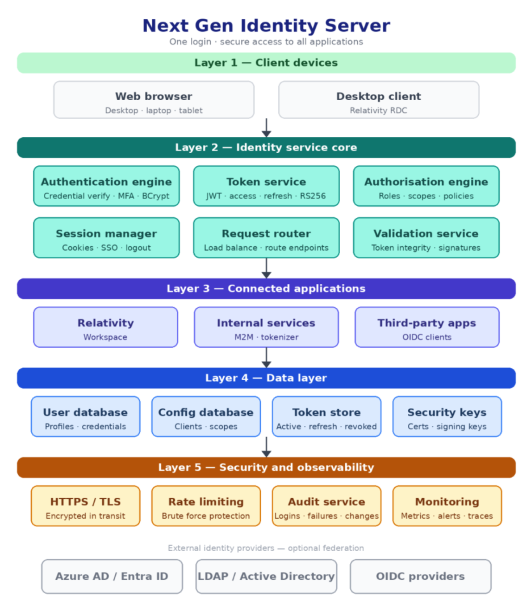
The Next Gen Identity Server ships as a WiX-based bootstrap executable (Relativity.Server.IdentityService.Installer.exe) and an MSI. The installer configures the identity service and establishes database connectivity. It integrates with Secret Store for credential management. It deploys runtime components to C:\Program Files\Relativity Identity Service\.
The installer creates:
[eddsdbo].[DeploymentLogs] confirming a successful install.From a customer perspective, deployment is an administrator-led activity. Administrators complete it as part of the Relativity Server installation or upgrade process. The installer supports interactive, command-line, and silent unattended modes.
For Relativity Server 2026 and later, the Next Gen Identity Server is a required component. Every environment must install, verify, and enable it,authentication does not function without it. This applies to both new deployments and upgrades from earlier versions.
Follow Pre-installation requirements in https://help.relativity.com/Server2026/Content/Installing_and_Upgrading/Pre-installation/Pre-installation.htm before running the installer. The installer validates most of these conditions and blocks if any are missing.
For the full preparation checklist see the Pre-Installation Guide.
The following steps summarize the deployment experience at a high level. They are brief and do not replace the detailed installation guide.
Relativity.Server.IdentityService.Installer.exe on the Identity Server host.https://[domainname]/RIS/Healthcheck and https://[domainname]/RIS/Diagnostics.https://[domainname]/RIS/.well-known/openid-configuration.Figure 2. Deployment at a glance
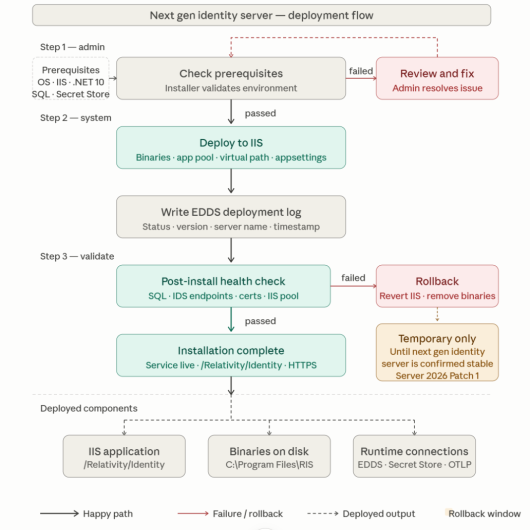
/RIS.Relativity Server supports multiple authentication methods for users and services, including:
For detailed configuration guidance for each method, see the Relativity Authentication documentation.
The following table compares IdentityServer3 with the Next Gen Identity Server.
| Area | IdentityServer3 | Next Gen Identity Server |
|---|---|---|
| Identity architecture | Embedded inside the main Relativity web application | A dedicated identity service deployed as /RIS under the Default Web Site |
| Technology foundation | Built on an older identity framework and hosting model | Built on IdentityServer 7 with an ASP.NET Core 10 foundation |
| Supportability | Based on legacy technology that is harder to extend and sustain | Built on a commercially supported, actively maintained identity platform |
| Deployment model | Comes online as part of the existing Relativity web tier | Installed by a dedicated WiX installer as a distinct IIS application |
| Separation of concerns | Authentication is tightly coupled with the main Relativity application | Authentication is handled by a dedicated identity layer that connects to Relativity |
| Credential management | Credentials managed within the Relativity application tier | Credentials retrieved securely from Relativity Secret Store at runtime |
| Enterprise identity alignment | Supports existing federation options but is based on an older architecture | Designed around modern identity standards and enterprise identity integration patterns |
| Customer experience | Login is integrated into the Relativity experience today | Preserves a familiar sign-in experience while changing the identity foundation underneath |
The following table lists the companion documents for this guide.
| Document | Purpose |
|---|---|
| Deployment Guide | Landing page - minimum requirements, deployment path selection, and navigation to all guides. |
| Pre-Installation Guide | Environment preparation checklist - prerequisites, service account, network, and certificates. |
| Installation Guide | Step-by-step installer walkthrough - interactive, command-line, and silent modes. |
| Post-Installation Verification | How to confirm the service is healthy and the deployment succeeded. |
| Troubleshooting Guide | Symptom, cause, and resolution reference for installation and sign-in issues. |
This section answers common questions about installing, configuring, and operating the Next Gen Identity Server.
The following questions cover environment requirements and preparation before running the installer.
What are the system requirements before installing?
The Identity Server host must meet Relativity's standard OS, IIS, and .NET prerequisites. See the Relativity system requirements page and the Pre-Installation Guide for the Identity-Server-specific checklist.
Why does the installer need access to Secret Store?
The installer uses Secret Store to securely retrieve and manage the EDDS database credentials required for deployment and runtime operation. No plain-text passwords are stored in configuration files. The installer validates Secret Store connectivity before writing any files.
What service account is required?
The identity service requires a Windows domain or local account with the Log on as a service right. The account runs the Identity IIS application pool and is used to authenticate to SQL Server and Secret Store. The installer validates the account credentials before proceeding.
What infrastructure information should I have ready before installing?
Have the following ready before launching the installer:
SERVER\INSTANCE formatThe following questions cover installer behavior and supported installation modes.
What does the installer do?
The installer validates prerequisites, copies the self-contained service binaries to C:\Program Files\Relativity Identity Service\, creates the Identity application pool and the /RIS IIS application, and writes a deployment record to [eddsdbo].[DeploymentLogs].
Can I automate or run the installation silently?
Yes. The installer supports silent mode with /quiet and command-line property passing for automated deployments. See the Installation Guide for the full syntax and supported properties.
What happens if a prerequisite check fails?
The installer halts before writing any files and displays the specific failure - for example, .NET 10 Hosting Bundle must be installed. Resolve the prerequisite and rerun. The installer log captures the detail for troubleshooting.
Where is the identity service installed?
The service is installed to C:\Program Files\Relativity Identity Service\ and hosted as the /RIS application under the Default Web Site in IIS.
The following questions cover health verification and readiness checks after installation.
How do I verify that the service is healthy after installation?
Check both health endpoints immediately after installation:
https://[domainname]/RIS/Healthcheck - confirms the service is running and responsive.https://[domainname]/RIS/Diagnostics - confirms connectivity to the EDDS database and Secret Store.Both should return a healthy status. See the Post-Installation Verification guide for the full verification matrix.
What should I verify before enabling broader use?
Verify both health endpoints, confirm the OIDC discovery document is accessible at https://[domainname]/RIS/.well-known/openid-configuration, and validate representative sign-in scenarios using test accounts.
What is the Identity Provider URL and why does it matter?
The Identity Provider URL is the base endpoint Relativity uses to reach the identity service - https://[domainname]/RIS. If it is incorrect or unreachable, authentication fails and users cannot sign in.
Can I revert to Identity Server 3 after switching to Next Gen Identity Server?
Yes. A single instance setting controls authentication routing, so an environment can switch to Next Gen Identity Server and revert to Identity Server 3 if needed. This rollback option is time-bound and is available only while both identity servers are present in the environment. A future Relativity Server 2026 update will remove the Identity Server 3 code once stability is confirmed; after that update, reverting to IS3 will no longer be possible. Contact Relativity Support before enabling Next Gen Identity Server in production. Confirm the current rollback window for your release. The Troubleshooting Guide covers the rollback procedure.
The following questions cover monitoring, certificate management, upgrades, and uninstallation.
Is the Next Gen Identity Server supported in a load-balanced or high-availability environment?
Not in EA. The EA release is intentionally scoped to a single server deployment. Multi-server high-availability deployment will be available for GA.
Where should I start if a user cannot log in?
Start with the two health endpoints: https://[domainname]/RIS/Healthcheck and https://[domainname]/RIS/Diagnostics. If Diagnostics reports a failure, check SQL Server connectivity and Secret Store access. Consult the Troubleshooting Guide for the full diagnostic flow.
How are client applications and redirect URIs handled?
Client application and redirect behavior are controlled through the identity service configuration and related Relativity settings. Use the official configuration guidance to register and manage these settings.
What cookies or session state does the service use?
The Next Gen Identity Server uses authentication and session cookies to maintain user sign-in state and related security protections. Review the formal cookie and security documentation for details.
How should I monitor the service in production?
Monitor both health endpoints, IIS application pool state, and the OpenTelemetry Protocol (OTLP) telemetry output. The service emits traces and metrics to the configured OpenTelemetry Collector endpoint. Use the operations and troubleshooting documentation to define monitoring and alerting strategies.
How are signing certificates managed?
Manage signing certificates through Relativity Secret Store. Do not rotate or update these certificates without following the product's certificate management guidance.
How do I upgrade to a newer version?
Run the newer installer bundle. It follows the MSI major upgrade pattern and automatically removes the prior version before installing the new one. The installer preserves the appsettings.json configuration file. The installer does not support downgrades.
How do I uninstall the service?
Run the installer bundle with the /uninstall flag. This removes the installation directory, the Identity application pool, and the /RIS IIS application, and writes a final record to [eddsdbo].[DeploymentLogs]. See the Installation Guide for the full uninstall workflow.
