


Feedback

This guide helps Relativity admins quickly transition from SQL to Kibana search by providing side-by-side examples of common queries. Use this as a quick reference when you need to find logs in Kibana.
This guide assumes you're already familiar with the Kibana Discover UI basics. If not, review the Introduction to Kibana Discover UI first.
Kibana supports two query languages. Here's when to use each:
Think of KQL as: Your WHERE clause in SQL's simple filtering and pattern matching.
Think of ES|QL as: Full SQL including GROUP BY, ORDER BY, LIMIT, and aggregate functions like COUNT(), AVG(), and SUM().
logs-* for application logs* for pattern matching, but be specific to maintain performanceUse KQL for simple filtering and searching the equivalent of your SQL WHERE clause.
How you'd think about it in SQL:
SELECT * FROM [EDDSLogging].[eddsdbo].[RelativityLogs] WHERE Message LIKE '%error%'
How to do it in Kibana (KQL):
error
Searches across all fields for the word "error". Case-insensitive by default.
SQL approach:
SELECT * FROM [EDDSLogging].[eddsdbo].[RelativityLogs]
WHERE Message LIKE '%error%' OR Message LIKE '%warning%'
Kibana (KQL):
error OR warning
Finds logs containing either "error" OR "warning".
SQL approach:
SELECT * FROM [EDDSLogging].[eddsdbo].[RelativityLogs]
WHERE (Message LIKE '%error%' OR Message LIKE '%warning%')
  AND (Message LIKE '%document%' OR Message LIKE '%import%')
Kibana (KQL):
(error OR warning) AND (document OR import)
Use parentheses to group conditions, just like SQL.
SQL approach:
SELECT * FROM [EDDSLogging].[eddsdbo].[RelativityLogs]
WHERE Message = 'Failed to retrieve favorites'
Kibana (KQL):
"Failed to retrieve favorites"
Quotes ensure the exact phrase is matched.
SQL approach:
SELECT * FROM [EDDSLogging].[eddsdbo].[RelativityLogs]
WHERE Level = 'Error' OR Level = 'Fatal'
Kibana (KQL):
log.level:"Error" OR log.level:"Fatal"
Field names follow dot notation (e.g., log.level, labels.Application).
SQL approach:
SELECT * FROM [EDDSLogging].[eddsdbo].[RelativityLogs]
WHERE Exception LIKE '%The application failed%'
Kibana (KQL):
error.stack_trace:*The application failed*
The * wildcard matches any characters, similar to % in SQL.
SQL approach:
SELECT * FROM [EDDSLogging].[eddsdbo].[RelativityLogs]
WHERE Exception LIKE '%The application failed%'
  AND Level != 'Information'
Kibana (KQL):
error.stack_trace:*The application failed* AND NOT log.level:"Information"
Use NOT to exclude specific values.
SQL approach:
SELECT * FROM [EDDSLogging].[eddsdbo].[RelativityLogs]
WHERE (Level = 'Error' OR Level = 'Fatal')
  AND Properties.value('(//Application)[1]', 'nvarchar(max)') = 'Imaging'
  AND Properties.value('(//SubSystem)[1]', 'nvarchar(max)') = 'Import'
Kibana (KQL):
(log.level:"Error" OR log.level:"Fatal") AND labels.Application:"Imaging" AND labels.SubSystem:"Import"
Combine multiple field filters to narrow down results.
SQL approach:
SELECT * FROM [EDDSLogging].[eddsdbo].[RelativityLogs]
WHERE Properties.value('(//HostName)[1]', 'nvarchar(max)') = 'RELVM-WEB01'
Kibana (KQL):
host.name:"RELVM-WEB01"
SQL approach:
SELECT * FROM [EDDS].[eddsdbo].[Agent]
WHERE Enabled = 0
**Kibana (KQL):
relsvr.agent.disabled:1
KQL works like your SQL WHERE clause:
-- SQL pattern
SELECT * FROM [EDDSLogging].[eddsdbo].[RelativityLogs] WHERE [conditions]

-- Maps to KQL pattern
[field]:[value] AND/OR [field]:[value]
Common KQL patterns:
field:value | exact match on a fieldfield:*partial* | wildcard search"exact phrase" | match complete phraseAND, OR, NOT | logical operators(...) | group conditions
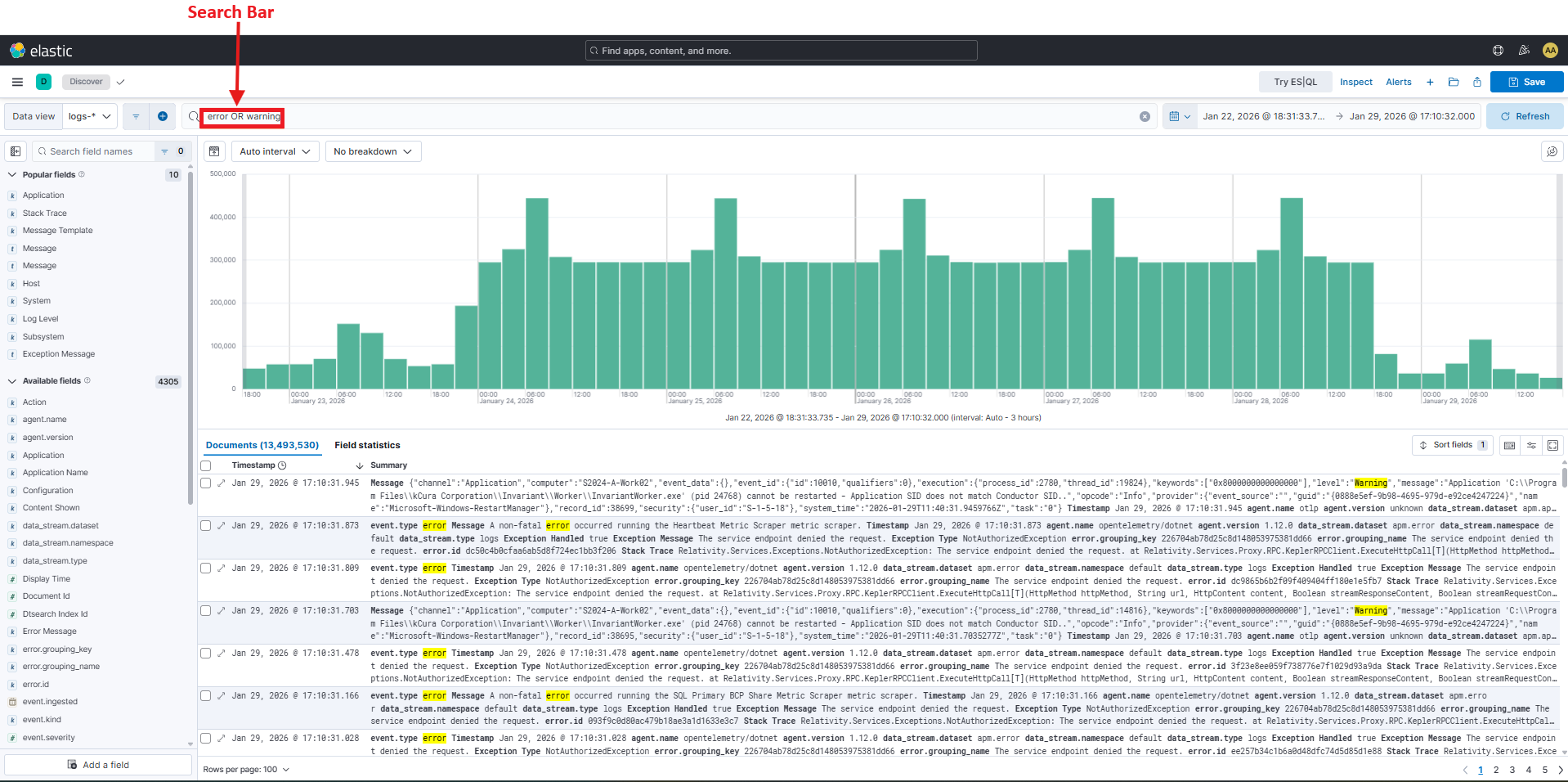
The screenshot above highlights a side-by-side comparison showing how SQL WHERE clauses translate to KQL field:value syntax. Notice how SQL's LIKE operator with % wildcards becomes * in KQL.
Use ES|QL when you need aggregations, grouping, or calculations or the full power of SQL including GROUP BY, COUNT(), AVG(), and ORDER BY.
ES|QL uses a pipe-based syntax where data flows through transformations:
FROM [data-view]
| WHERE [filter-conditions]
| STATS [aggregations] BY [group-by-fields]
| SORT [field] DESC
| LIMIT [number]
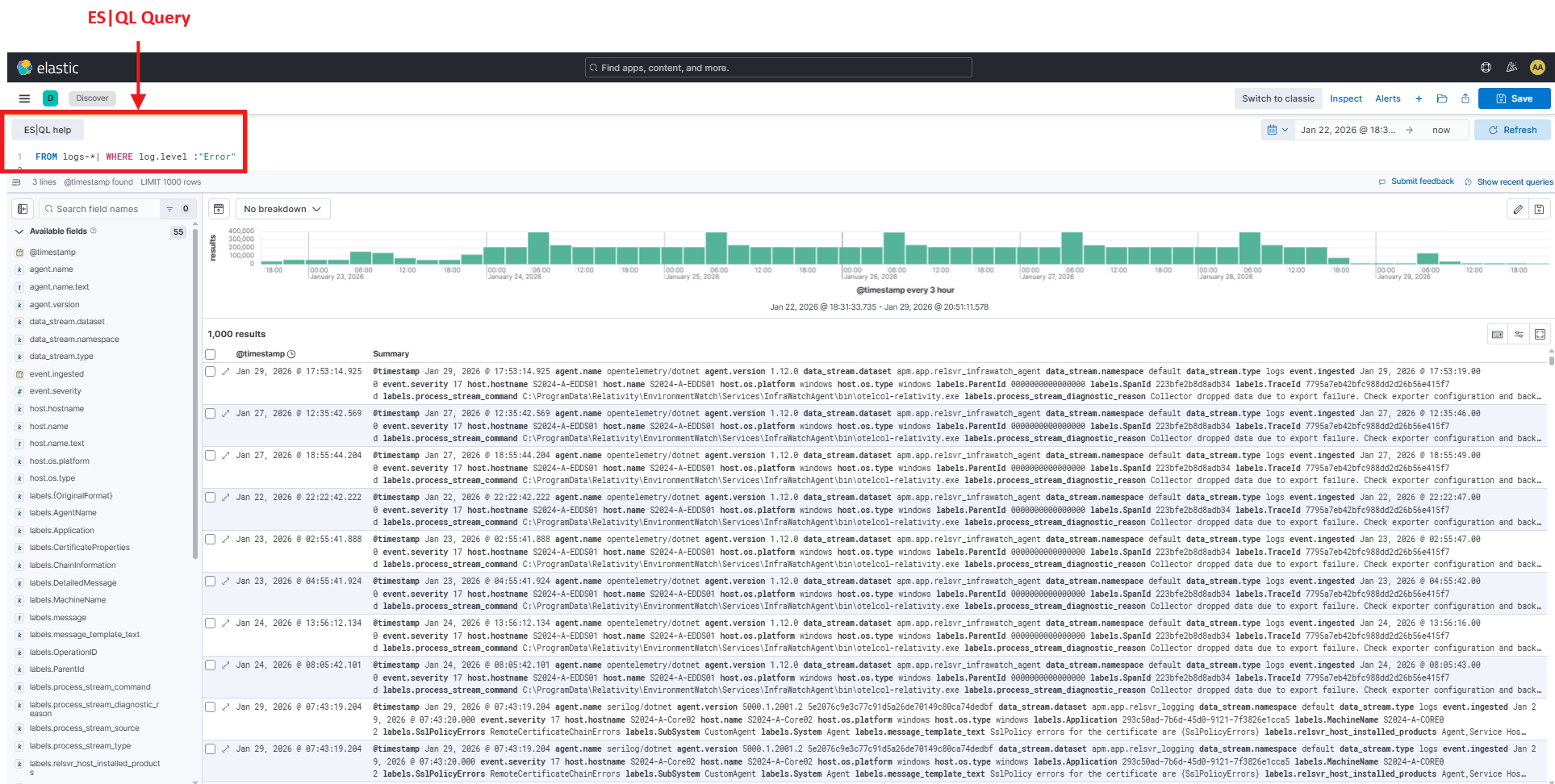
The screenshot above highlights an example of an ES|QL query showing the pipe-based syntax. Notice how each line starts with a pipe (|) and operations flow top to bottom: FROM | WHERE | STATS | SORT. The results table appears below the query.
SQL approach:
SELECT COUNT(*) AS total_logs
FROM [EDDSLogging].[eddsdbo].[RelativityLogs]
Kibana (ES|QL):
FROM logs-*
| STATS total_logs = count()
SQL approach:
SELECT Level, COUNT(*) AS log_count
FROM [EDDSLogging].[eddsdbo].[RelativityLogs]
GROUP BY Level
ORDER BY log_count DESC
Kibana (ES|QL):
FROM logs-*
| STATS log_count = count() BY log.level
| SORT log_count DESC
SQL approach:
SELECT
    Properties.value('(//Application)[1]', 'nvarchar(max)') AS Application,
    COUNT(*) AS error_count
FROM [EDDSLogging].[eddsdbo].[RelativityLogs]
WHERE Level = 'Error'
GROUP BY Properties.value('(//Application)[1]', 'nvarchar(max)')
ORDER BY error_count DESC
Kibana (ES|QL):
FROM logs-*
| WHERE log.level == "Error"
| STATS error_count = count() BY labels.Application
| SORT error_count DESC
Note: ES|QL uses == for equality in WHERE clauses (not single =).
SQL approach:
SELECT TOP 5
    Properties.value('(//Application)[1]', 'nvarchar(max)') AS Application,
    COUNT(*) AS error_count
FROM [EDDSLogging].[eddsdbo].[RelativityLogs]
WHERE Level = 'Error'
GROUP BY Properties.value('(//Application)[1]', 'nvarchar(max)')
ORDER BY error_count DESC
Kibana (ES|QL):
FROM logs-*
| WHERE log.level == "Error"
| STATS error_count = count() BY labels.Application
| SORT error_count DESC
| LIMIT 5
SQL approach:
SELECT
    Properties.value('(//HostName)[1]', 'nvarchar(max)') AS HostName,
    COUNT(*) AS log_count
FROM [EDDSLogging].[eddsdbo].[RelativityLogs]
GROUP BY Properties.value('(//HostName)[1]', 'nvarchar(max)')
ORDER BY log_count DESC
Kibana (ES|QL):
FROM logs-*
| STATS log_count = count() BY host.name
| SORT log_count DESC
SQL approach:
SELECT
    DATEPART(HOUR, TimeStamp) AS hour,
    COUNT(*) AS error_count
FROM [EDDSLogging].[eddsdbo].[RelativityLogs]
WHERE Level = 'Error'
  AND Properties.value('(//Application)[1]', 'nvarchar(max)') = 'Imaging'
  AND TimeStamp >= DATEADD(DAY, -1, GETDATE())
GROUP BY DATEPART(HOUR, TimeStamp)
ORDER BY hour
Kibana (ES|QL):
FROM logs-*
| WHERE log.level == "Error" AND labels.Application == "Imaging"
| STATS error_count = count() BY hour = DATE_TRUNC(1 hour, @timestamp)
| SORT hour
SQL approach:
SELECT
    Properties.value('(//Application)[1]', 'nvarchar(max)') AS Application,
    COUNT(*) AS error_count
FROM [EDDSLogging].[eddsdbo].[RelativityLogs]
WHERE Level = 'Error'
GROUP BY Properties.value('(//Application)[1]', 'nvarchar(max)')
HAVING COUNT(*) > 100
ORDER BY error_count DESC
Kibana (ES|QL):
FROM logs-*
| WHERE log.level == "Error"
| STATS error_count = count() BY labels.Application
| WHERE error_count > 100
| SORT error_count DESC
Note: In ES|QL, the second WHERE acts like SQL's HAVING clause.
SQL approach:
SELECT
    Properties.value('(//Application)[1]', 'nvarchar(max)') AS Application,
    COUNT(*) AS total_logs,
    SUM(CASE WHEN Level = 'Error' THEN 1 ELSE 0 END) AS error_count,
    SUM(CASE WHEN Level = 'Warning' THEN 1 ELSE 0 END) AS warning_count
FROM [EDDSLogging].[eddsdbo].[RelativityLogs]
GROUP BY Properties.value('(//Application)[1]', 'nvarchar(max)')
Kibana (ES|QL):
FROM logs-*
| STATS
    total_logs = count(),
    error_count = count_if(log.level == "Error"),
    warning_count = count_if(log.level == "Warning")
  BY labels.Application
SQL approach:
SELECT
    Properties.value('(//Application)[1]', 'nvarchar(max)') AS Application,
    Properties.value('(//SubSystem)[1]', 'nvarchar(max)') AS SubSystem,
    COUNT(*) AS error_count
FROM [EDDSLogging].[eddsdbo].[RelativityLogs]
WHERE Level = 'Error'
GROUP BY Properties.value('(//Application)[1]', 'nvarchar(max)'), Properties.value('(//SubSystem)[1]', 'nvarchar(max)')
ORDER BY error_count DESC
Kibana (ES|QL):
FROM logs-*
| WHERE log.level == "Error"
| STATS error_count = count() BY labels.Application, labels.SubSystem
| SORT error_count DESC
ES|QL provides full SQL-like querying:
-- SQL pattern
SELECT [fields], COUNT(*), AVG(field)
FROM [table]
WHERE [conditions]
GROUP BY [fields]
HAVING [aggregate-conditions]
ORDER BY [field] DESC
LIMIT [number]

-- Maps to ES|QL pattern
FROM [data-view]
| WHERE [conditions]
| STATS [aggregations] BY [group-fields]
| WHERE [aggregate-conditions]
| SORT [field] DESC
| LIMIT [number]
Key ES|QL Commands:
FROM | Select data source (like SQL FROM)WHERE | Filter rows (like SQL WHERE and HAVING)STATS | Aggregate data (like SQL SELECT with aggregates)BY | Group results (like SQL GROUP BY)SORT | Order results (like SQL ORDER BY)LIMIT | Restrict results (like SQL TOP or LIMIT)EVAL | Create calculated fields (like SQL calculated columns)Important differences from SQL:
== for equality (not =) in WHERE clauses| pipes to chain operations instead of commaserror_count = count()Copy and paste these frequently-used queries:
relsvr.agent.disabled:1
relsvr.agent.disabled:1 AND labels.relsvr_agent_type:"Billing Agent"
labels.message_template_text:"GetServiceLocationAsync lookup for {ServiceIdentifier} {ServiceVersion} failed!"
error.stack_trace:*SqlException* OR error.stack_trace:*connection*
error.stack_trace:*timeout* OR error.message:*timeout*
labels.rabbitmq_node_name:*
(log.level:"Error" OR log.level:"Fatal") AND labels.SubSystem:"Import"
(log.level:"Error" OR log.level:"Fatal") AND labels.relsvr_agent_type:*
Set time range to "Last 15 minutes" in the Kibana UI.
