This page contains release notes for Relativity Server 2023 and later. You can use the tabs to switch between product release notes, release notes relevant to developers, and known issues. Click on any column heading to sort/reverse-sort the column. Select values in the drop-down controls to set filters for certain columns, or use the Search box to search for specific text in the Description column.
You can also download (or monitor) the release notes data as a .JSON file for further processing, or use your preferred RSS feed reader to subscribe to the RSS feed.
This is the new and improved release notes page. If you have feedback about this new page, please use the feedback controls at the bottom this page to share your input.
The Initial release date represents the first availability/release of the feature or fix.
Use the Product version, Update type, Hot fix version, and Patch version columns to identify exactly which Server release a change shipped in. Examples:
To see a list of available Hot Fixes for Relativity Server 2024, select Server 2024 from the Version column, and then select Hot fix from the Update Type column. You can click the Original Release Date column to sort the filtered results by release date, descending or ascending.
To see a list of Hot fixes included in a specific patch for Server 2024, select Server 2024 from the Version column, and then select the desired patch name in the Patch Version column. You can then select Hot fix from the Update Type column, which will show hot fixes that are included in the patch version that you selected.
To see if a particular fix is included in a patch or hot fix for different versions of Relativity Server, enter the text of the fix in the Search box. This will return all release notes containing the entered text. If a particular item was released for both Server 2024 and Server 2023, you may see multiple rows in the list of Release note items.
On the Known Issues tab, an issue may apply to more than one Server version. The Identified in Version and Resolved in Version columns can list multiple versions, and each version remains independently filterable.
To view release notes for Relativity Server 2022, Relativity Server 2021, and Relativity Server 10.3, please see the Release Notes page in the Relativity Server 2022 documentation.
Product Version: This is the 'base' version of Relativity Server, for example Server 2024 or Server 2023. Remember that Hot Fixes and Patches apply only to specific versions of Relativity Server.
Update Type: this is the type of installer that the release item was first released in. Some items are first released in Hot Fixes, while others are first released in Patches.
Base: these items are included in the initial release for that version of Relativity Server.
Hot fix: these items were first released in a Hot Fix (but may subsequently be included in a Patch; if there is a value in the Patch version column, it means that this item is also available in that Patch)
Patch: these items were first released in a Patch.
Hot Fix Version: If the item was first released as a Hot Fix, this column shows the Hot Fix version that the item was first released in. Note that Hot Fixes are cumulative, see Learn more about hot fixes and patches.
If Hot Fix version is blank, that particular item was not first released as a separate Hot Fox, but was included in the Base release or in a Patch.
Patch Version: This is the Patch version that the release item is included in. Patches are essentially collections of all preceding Hot Fixes for that version of Relativity Server, but can include additional fixes as well.
If Patch version is blank, that item was either included in the initial base release, or is only available as a Hot Fix and is not yet included in a Patch.
Initial Release Date: This is the date when that item was released for the first time.
Type: This categories the change type of the item, for example a Resolved Defect or an Enhancement.
Feature: This is the feature/application within Relativity that the item applies to.
Description: This is the release item description. Tip: you can search the Description field by entering text into the Search box. If you want to determine if the same fix was released for both Server 2024 and Server 2023 for example, use the Search box to filter rows for the specific item you are looking for, which will then tell you which release that item is included in for Server 2024 and in which release that item is included for Server 2023.
Relativity releases hot fixes and patches to remediate select defects and vulnerabilities found in supported Relativity Server versions. Hot fixes are unscheduled update releases to resolve higher impact defects or vulnerabilities. Patches are scheduled update releases that also include fixes for less severe/lower impact issues
Hot fixes and patches are associated with a specific version of Relativity Server. In other words, Relativity Server 2024 hot fix #1 is built for Relativity Server 2024 and cannot be applied to Relativity Server 2023. However, fixes in a hot fix for Relativity Server 2023 may be included in a separate hot fix for Relativity Server 2022.
Hot fixes and patches are cumulative for a base version of Relativity Server. Each hot fix and patch that Relativity Releases includes all previously-released hot fix and patch content for that base version. In other words, hot fix #2 for Relativity Server 2024 includes hot fix #1 for Relativity Server 2024. Patch #2 for Relativity Server 2024 includes patch #1, as well as any hot fixes released between patch #1 and patch #2.
This means you do not need to separately install previous hot fixes; the latest hot fix/patch will always include all preceding hot fixes and patches for that version of Relativity server.
Starting with Relativity Server 2024, we are introducing a new versioning scheme for hot fixes and patches. The first digit represents the patch number, and the second digit represents the hot fix number relative to the patch. This new versioning attribute is referred to as the update version.
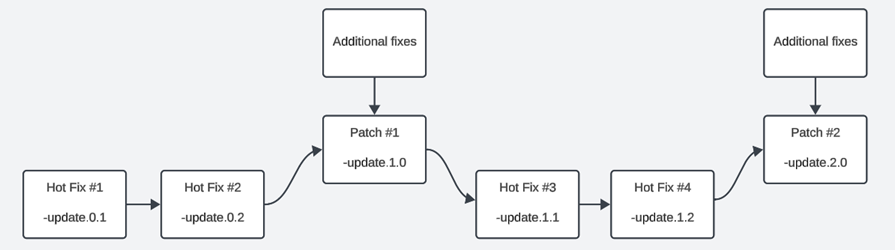
Consider the diagram below, which illustrates how the new update versioning scheme for Server 2024 would be applied during sequential hot fix and patch releases. In this diagram:
Hot fix #2 (update.0.2) also includes hot fix #1 (update.0.1) changes
Patch #1 (update.1.0) includes hot fix #1 and #2, as well as additional new fixes for the patch. (Since hot fix #2 includes hot fix #1, patch #1 includes hot fix #1 as well.)
Hot fix #3 (update.1.1) includes everything in patch #1. (Therefore, hot fix #3 includes hot fixes #1 and #2, as well as the additional fixes included in patch #1.)
Hot fix #4 (update.1.2) includes everything in hot fix #3. (And since hot fix #3 includes patch #1, everything up to an including hot fix #3 is included in hot fix #4.)
Patch #2 (update 2.0) includes patch #1 (update 1.0), hot fixes #3 and #4 (updates 1.1 and 1.2), and additional new fixes for the patch.


 Read more about the release notes page...