


Feedback

This document provides an overview of the custom JSON configuration file used by Environment Watch. The configuration allows users to centrally define and customize monitoring for:
The shared configuration file enables users to control what is monitored such as specific Windows services, certificate conditions, or custom log file sources and how alerts are delivered. Currently, Slack is the only supported notification platform. The notification configuration is designed to be extensible, allowing additional platforms to be supported in future releases. Because the configuration is external to the application, custom monitoring settings are preserved during Environment Watch upgrades, making the solution both extensible and upgrade-safe.
The configuration is organized in a hierarchical JSON format, with top-level sections and nested objects for each monitored entity. It will be saved in the BCPPath and inside the EnvironmentWatch folder. The name of the file will be environment-watch-configuration.json. Below is an example structure and explanation:
environmentWatchConfigurationmonitoring: Contains configuration for instance, installed products, hosts, and scrapers.
instance: Defines sources monitored at the instance level.installedProducts: A list of installed products, where each product defines its own monitoring sources.hosts: A list of hosts, where each host defines its own monitoring sources.scrapers: A list of scrapers with configurable intervals and parameters.openTelemetryOverrides: Contains custom OpenTelemetry Collector overrides.
logSources: A list of custom file log source configurations for the OTEL file log receiver.alertNotificationHandlers: Defines notification handlers (e.g., Slack).The instance section defines sources that are monitored at the environment or system-wide level, regardless of specific products or hosts.
The installedProducts section contains a list of installed products, where each product defines its own monitoring sources.
installedProducts section of the custom JSON configuration file.| Property | Description |
|---|---|
Generic
|
No Relativity Product is Installed |
QM
|
Queue Manager Server |
Worker
|
Worker Server |
Agent
|
Agent Server |
Web
|
Web Server Server |
SecretStore
|
Secret Store Server |
ServiceBus
|
Service Bus Server |
ServiceHost
|
Service Host Server |
SQLDistributed
|
SQL Distributed Server |
SQLPrimary
|
SQL Primary Server |
Caat
|
Analytics Server |
The hosts section contains multiple host objects, each specifying its own monitoring sources.
The openTelemetryOverrides section defines custom log source configurations for the OpenTelemetry Collector file log receiver. This allows Environment Watch to collect and parse application-specific log files.
The scrapers section allows customization of metric collection intervals and parameters for each scraper.
| Property | Description |
|---|---|
sources
|
Specifies what is monitored (certificates, windowsServices, sqlServers, etc.) |
enabled
|
Boolean flag to enable/disable monitoring for the source. |
include
|
List of specific items to monitor (service names, certificate details, etc.) |
otelCollectorYamlFiles
|
List of OpenTelemetry Collector YAML files (empty in this example). |
openTelemetryOverrides
|
Contains custom OpenTelemetry Collector overrides. |
- logSources |
List of custom log source configurations for the file log receiver. |
scrapers
|
List of scraper configurations with intervals and parameters. |
Base path: BCPPath
Folder: EnvironmentWatch
File name: environment-watch-configuration.json
Environment Watch automatically reads this file and applies the defined monitoring rules to the relevant instances, products, and hosts.
To identify the BCP path for the environment, navigate to the "Server" tab in the Relativity front end as shown below:
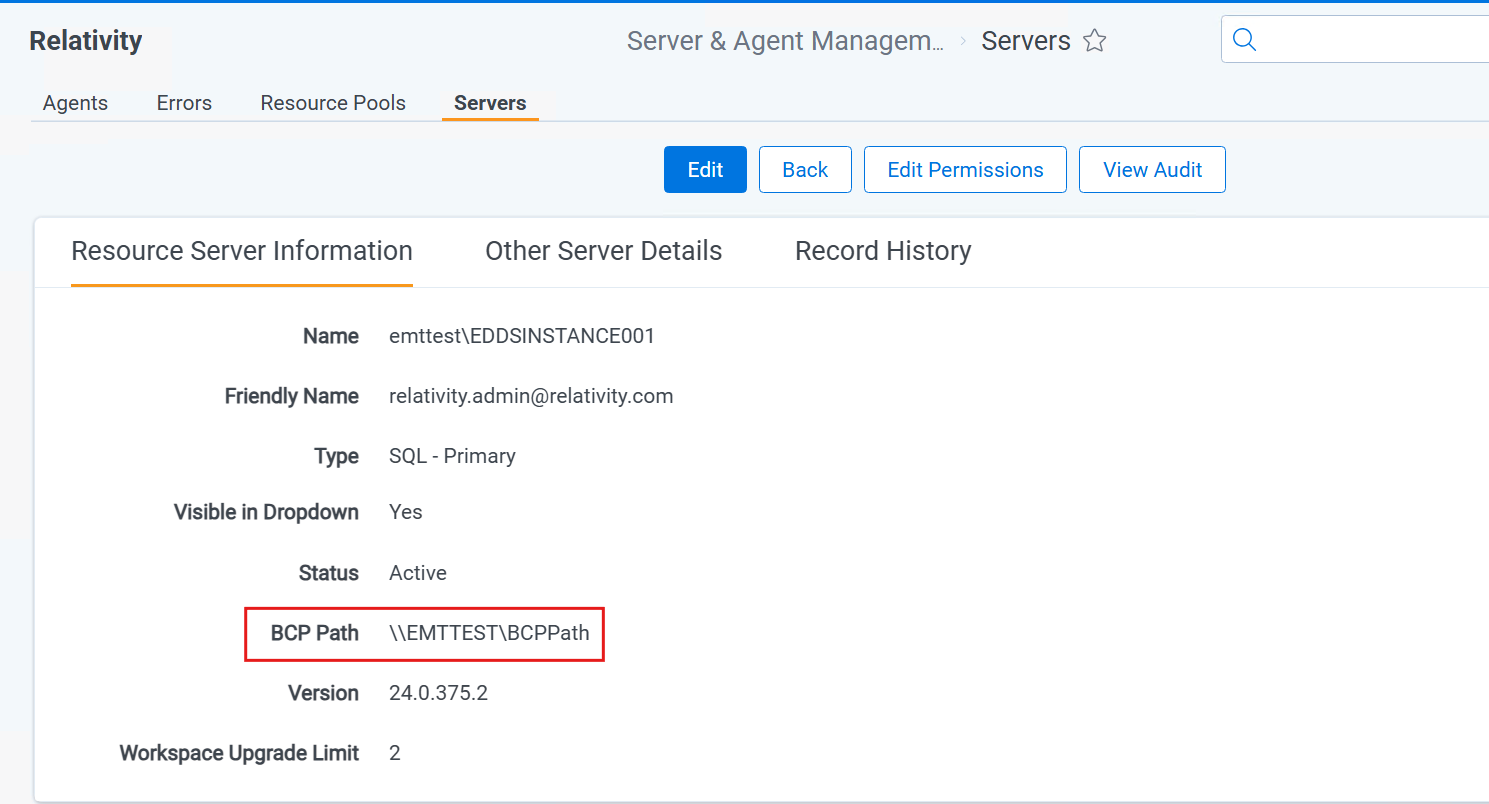
Complete path to the custom JSON configuration file will be:
\\EMTTEST\BCPPath\EnvironmentWatch\environment-watch-configuration.json
An example of the BCPPath and folder structure is shown below:
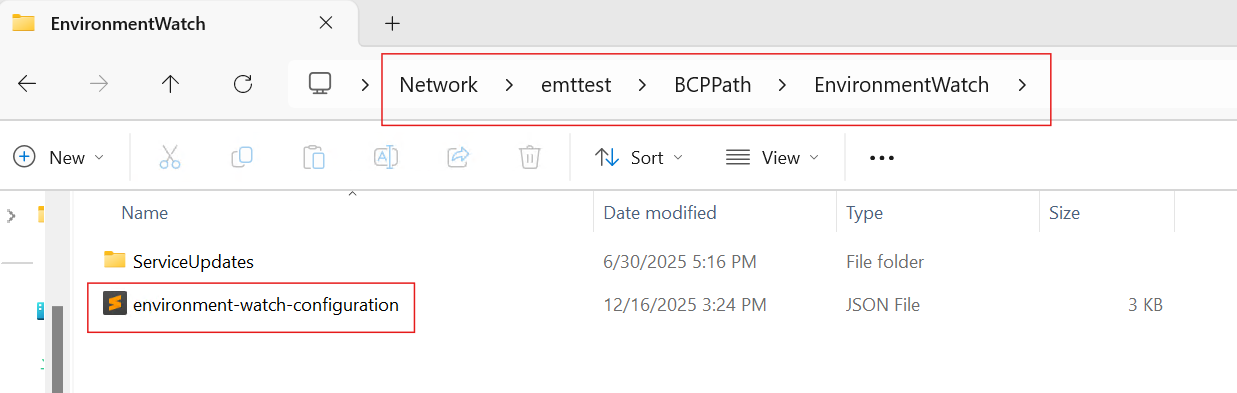
EW supports all BCP share configuration options available in Relativity. Primary SQL is just one of several supported configurations.
This section describes the main types of sources that can be monitored using the Environment Watch configuration: Windows services, certificates, Kibana Alerts through Slack notifications, SQL server instances, file log receivers, and scrapers. Each source type has its own configuration structure and properties. Following are the details for each source type:
For detailed instructions, see Certificates Configuration.
For detailed instructions, see Windows Service Configuration.
For detailed instructions, see Alert Notification Handlers.
For detailed instructions, see SQL Server Configuration.
For detailed instructions, see Scrapers Configuration.
For detailed instructions, see File Log Receiver Configuration.
{
    "environmentWatchConfiguration": {
        "monitoring": {
            "instance": {
                "sources": {
                    "certificates": {
                        "enabled": false,
                        "include": []
                    },
                    "windowsServices": {
                        "enabled": true,
                        "include": [
                            "WindowsAzureGuestAgent",
                            "mpssvc"
                        ]
                    }
                },
                "otelCollectorYamlFiles": []
            },
            "installedProducts": [
                {
                    "productName": "Web",
                    "sources": {
                        "certificates": {
                            "enabled": true,
                            "include": [
                                {
                                    "storeName": "My",
                                    "storeLocation": "LocalMachine",
                                    "thumbprint": "A54225760344699530649239D175BAA73C70DC1B"
                                }
                            ]
                        },
                        "windowsServices": {
                            "enabled": true,
                            "include": [
                                "IISADMIN",
                                "WinDefend"
                            ]
                        }
                    },
                    "otelCollectorYamlFiles": []
                },
                {
                    "productName": "Agent",
                    "sources": {
                        "certificates": {
                            "enabled": false,
                            "include": []
                        },
                        "windowsServices": {
                            "enabled": true,
                            "include": [
                                "RpcSs"
                            ]
                        }
                    },
                    "otelCollectorYamlFiles": []
                }
            ],
            "hosts": [
                {
                    "hostName": "SQL01",
                    "sources": {
                        "certificates": {
                            "enabled": true,
                            "include": []
                        },
                        "sqlServers": {
                            "enabled": true,
                            "include": [
                                {
                                    "clusterVirtualName": "SQLClusterName",
                                    "instanceName": "InstanceName"
                                }
                            ]
                        },
                        "windowsServices": {
                            "enabled": true,
                            "include": [
                                "MSSQLSERVER"
                            ]
                        }
                    },
                    "otelCollectorYamlFiles": []
                },
                {
                    "hostName": "DG01",
                    "sources": {
                        "certificates": {
                            "enabled": true,
                            "include": []
                        },
                        "windowsServices": {
                            "enabled": true,
                            "include": [
                                "Dhcp"
                            ]
                        }
                    },
                    "otelCollectorYamlFiles": []
                },
                {
                    "hostName": "DG02",
                    "sources": {
                        "certificates": {
                            "enabled": false,
                            "include": []
                        },
                        "windowsServices": {
                            "enabled": true,
                            "include": [
                                "Schedule"
                            ]
                        }
                    },
                    "otelCollectorYamlFiles": []
                },
                {
                    "hostName": "CORE01",
                    "sources": {
                        "certificates": {
                            "enabled": true,
                            "include": [
                                {
                                    "storeName": "My",
                                    "storeLocation": "LocalMachine",
                                    "thumbprint": "F8809D2677E010477847C92C5A1A673784537CBC"
                                },
                                {
                                    "storeName": "My",
                                    "storeLocation": "LocalMachine",
                                    "thumbprint": "984812C68F059EB19A346D538ECFB072968C11C3"
                                },
                                {
                                    "storeName": "My",
                                    "storeLocation": "LocalMachine",
                                    "thumbprint": "984812C68F059EB19A346D538ECFB072968C11C3"
                                }
                            ]
                        },
                        "windowsServices": {
                            "enabled": false,
                            "include": []
                        }
                    },
                    "otelCollectorYamlFiles": []
                },
                {
                    "hostName": "CORE02",
                    "sources": {
                        "certificates": {
                            "enabled": true,
                            "include": [
                                {
                                    "storeName": "My",
                                    "storeLocation": "LocalMachine",
                                    "thumbprint": "F8809D2677E010477847C92C5A1A673784537CBC"
                                }
                            ]
                        },
                        "windowsServices": {
                            "enabled": false,
                            "include": []
                        }
                    },
                    "otelCollectorYamlFiles": []
                }
            ],
            "scrapers": [
                {
                "name": "HeartbeatOtelMetricScraper",
                "parameters": {
                    "intervalSeconds": "30"
                }
                },
                {
                "name": "WindowsServiceOtelMetricScraper",
                "parameters": {
                    "intervalSeconds": "60"
                }
                },
                {
                "name": "X509CertificateOtelMetricScraper",
                "parameters": {
                    "intervalSeconds": "3600",
                    "expirationWarningDays": "30"
                }
                }
            ],
            "openTelemetryOverrides": {
                "logSources": [
                    {
                        "type": "rabbitmq",
                        "enabled": true,
                        "logFilePath": "C:\\rabbitmq\\data\\log\\rabbit@localhost.log",
                        "multilineStartPattern": "^\\d{4}-\\d{2}-\\d{2} \\d{2}:\\d{2}:\\d{2}\\.\\d{6}[+-]\\d{2}:\\d{2}",
                        "regexPattern": "^(?P<rabbitmq_log_date_time>\\d{4}-\\d{2}-\\d{2} \\d{2}:\\d{2}:\\d{2}\\.\\d{6}[+-]\\d{2}:\\d{2}) \\[(?P<severity>[a-z]*)\\] <(?P<rabbitmq_pid_node>\\d+)\\.(?P<rabbitmq_pid_process>\\d+)\\.(?P<rabbitmq_pid_serial>\\d+)>[ \\t]*(?P<message>[\\s\\S]*)$",
                        "timestampLayout": "%Y-%m-%d %H:%M:%S.%f%j"
                    }
                ]
            }
        },
        "alertNotificationHandlers": {
            "slack": {
                "accessToken": "slack-access-token",
                "acknowledgeAlertEnabled": false,
                "channel": "ABC12M3PQR4",
                "enabled": true,
                "messageIntervalSeconds": 180
            }
        }
    }
}
otelCollectorYamlFiles is currently not used and not yet supported.
