Last date modified: 2026-Oct-21
Index Management
The Index Manager contains the list of indexes created in Assist or Case Strategy. An index is a set of documents that Assist searches to answer prompts. Each index is built from the extracted text of documents available in public saved searches within a workspace. Users can choose the index that best matches their prompt, or switch indexes to search for different topics or document sets in the same workspace.
Users responsible for managing indexes must be granted the Index Management permission to create, rebuild, and delete indexes. Individuals with Prompting permission may access the Index Manager list to select an index for their prompt. See Permissions for details on the Index Management and Prompting permissions.
Suggested resources:
- Working with indexes for how to create, edit, delete, export, and maintain indexes.
- Best practices for recommendations on preparing your data for indexing.
- Frequently asked questions for helpful answers to common questions about indexes and index management.
Case Home index created in Case Strategy
Case Strategy users can create a Case Home index based on the documents within a saved search used for Fact Generation. The index enables Assist to support case strategy development using the same document set used in Case Strategy analysis.
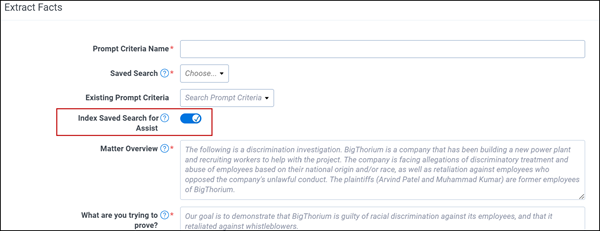
- The Case Home index cannot be edited or rebuilt from Index Manager, because it is managed by the Case Strategy application.
- Metadata mapping is not supported for the Case Home index. It is only supported for indexes created using Assist. See Metadata Mapping for more information.
Indexes created within Assist
Indexes can be created manually within Assist from public saved searches within the workspace. See Index and document limits for additional information.
- Each index can include up to 300,000 documents.
- Each workspace can have up to five (5) indexes, or six (6) if one is the Case Home index created in Case Strategy. See Working with indexes for details on adding and deleting indexes.
- The indexes define the datasets from which Assist retrieves and generates answers.
Throughput expectations
- Indexing speed varies by dataset size, document complexity, and available workspace resources. While typical cases are optimized, larger or complex datasets may take more time, possibly up to 6 hours, to finish with either a "Successfully build" or "Partially build" status.
- Index creation is a background process that progresses automatically once initiated. While exact durations vary, it is recommended to allow sufficient processing time for workspaces containing large volumes of documents or complex extracted text.