Last date modified: 2026-Oct-21
Data Breach Response (aiR for Data Breach Response)
Data Breach Response is a Relativity product purpose-built to support and help streamline the process of identifying, extracting, and linking Personal Information (PI) and Personal Health Information (PHI) to the relevant individual or organization, and generating a consolidated list of potentially impacted individuals using generative artificial intelligence (AI).
Data Breach Response is available as a Relativity application (RAP). You can install the application into a Relativity aiR Review workspace that runs within a Relativity aiR production environment. (The data used for analysis never leaves the Relativity aiR security boundary, which aligns with security and compliance requirements defined in Relativity aiR contracts.)
- Input—Documents identified by a Saved Search to be analyzed by Data Breach Response
- Output—A notification report containing impacted individuals and their associated PI or PHI
See these related resources for more information:
- A Focus on Security and Privacy in Relativity’s Approach to Generative AI
- Six characteristics of Generative AI and their impact on aiR products
- Relativity aiR Ask the Expert: Generative AI Fundamentals in Relativity
Conceptual workflow
The steps below illustrate high level workflow steps for the Data Breach Response product
- Upload and process documents in your Relativity aiR environment.
- Configure the Data Breach Response application into your environment and review workspace.
- Start a new Data Breach ingestion job and select the saved search of documents for review.
- Go to Settings and select PI and PHI detectors you want to use. Add any custom detectors.
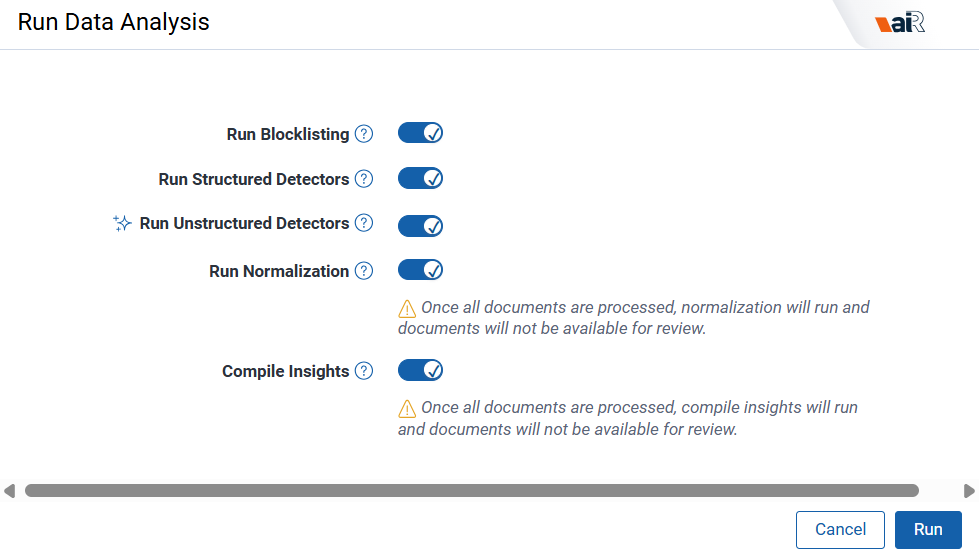
- Navigate to the Data Analysis tab and run Data Analysis. As PI detection completes, you can view insights on identified, extracted, and linked PI and begin reviewing documents. Access documents on the project dashboard as they become available during processing. If you run the normalizer step, the application automatically generates the entity report.
- Access the Project Dashboard to view PI and PHI identification, extraction, linking, and any document errors across the document set.
- Review the Entity Analysis tab to resolve conflicts and review and finalize your desired output.
Document requirements
Following are document requirements for Data Breach Response:
- Data Breach Response can support up to 300M PI annotations and 150M entities, represented across 1 TB of native data in an Data Breach Response workspace.A document quota applies to each Data Breach Response workspace to help ensure optimal analysis performance. This is tracked in the Ingestion tab. You can process a larger volume of documents by running them in increments, scaling up until you reach the full quota available.
- The following document types are not supported:
- Documents that open with an error or warning
- Excel files older than Excel 95 (v 7.0)
- Native spreadsheets greater than 40MB native size
- Native non-spreadsheets greater than 75MB native or 10MB extracted text size
- Documents without a native file in RelativityThe native can be a plain text file.
Unstructured and Structured documents
Data Breach Response categorizes documents as either Unstructured or Structured. Data Breach Response leverages different AI-based methods to deliver the most efficient process for each type of document.
- Unstructured documents—contain unlabeled or otherwise unorganized data. The content on the files are usually composed of natural language. Examples of unstructured documents include text-based documents such as emails, word processing documents, and forms with additional unstructured data sources such as photos, and audio files. Data Breach Response uses document context to help differentiate between types of PI. aiR can automatically identify and link potential PI across unstructured documents, which may help accelerate review and quality control processes. Data Breach Response also normalizes entities across documents and generates a consolidated notification list for review, supporting efforts to meet mandated response timelines.
To review Unstructured documents, see Unstructured document review. - Structured documents—contain data that is organized in a specific and predefined way, typically in a table with columns and rows where each data point has a specific data type. Examples of structured documents include spreadsheets and CSV files. Data Breach Response identifies table boundaries and analyzes header and column content to help predict potential PI. For structured documents, the workflow relies on table detection and analysis of column headers and values to support more consistent extraction.
To review Structured documents, see Structured document review.
Supported file types
The following types of structured and unstructured documents are supported:
| Document type | Supported extensions | Limitations and notes |
|---|---|---|
| Unstructured documents |
.ppt, .pptx, .pptm, .doc, .docx , .txt , .eml, .msg, .mht, .svg, .pdf, .fdf, .xfdf, .pub, .dwg, .dxf, .dgn, .rvt, .dwf, .odt, .odp, .rtf, .wpf, .wmf, .emf, .hdp, .jpc, .xps, .oxps, .xml, .xod, .xaml, .vcf
|
Embedded documents are not supported. Extracted text is leveraged for emails, so formatting may be lost.
|
| Structured documents |
.csv, .tsv, .xls, .xlsx, .xlsm, .xlt, .xltm, .xltx, .xlsb |
CSVs must be delimited by comma. No other delimiter is supported. TSVs must be delimited by tab. No other delimiter is supported. |
Considerations
Data Breach Response harnesses the power of large language models (LLM) to review documents. While these technologies are powerful, they also come with limitations. It’s important that you understand these limitations and use the product with appropriate care.
All Data Breach Response outputs should be reviewed by a human. There are known risks that the AI may:
- Omit critical information, such as Personal Information (PI) or Personal Health Information (PHI)
- Incorrectly identify non-personal data as PI
- Flag documents as containing PI when they do not—or fail to flag documents that do
- Mislabel or miscategorize data
- Fabricate PI that does not actually exist in the source document
Security and privacy
Azure OpenAI does not retain any data from the documents being analyzed. Data you submit for processing by Azure OpenAI is not retained beyond your organization’s instance, nor is it used to train any other generative AI models from Relativity, Microsoft, or any other third party. For more information, see Data Security.
Database backups for Data Breach Response are performed every four hours in alignment with Relativity protocol. In case of emergency outages, this would protect your data in a recovery scenario.
Language support in Data Breach Response
Data Breach Response has been primarily tested on English-language documents. Accuracy is not guaranteed to be equivalent for other languages. However, the LLM is language agnostic and therefore supports global languages.
For the study used to evaluate Azure OpenAI's LLM across languages, see MEGAVERSE: Benchmarking Large Language Models Across Languages, Modalities, Models and Tasks on the arXiv website.
Running Data Breach Response
To run Data Breach Response:
- Before running the first ingestion job, navigate to Settings and make sure GenAI Mode is toggled on in your workspace.You can enable GenAI Mode only for workspaces that have never run Data Breach Response. You cannot convert existing workspaces that have already started running jobs with Data Breach Response.
- Select other settings as usual and Save.
- Proceed to Data Analysis as usual and start running the processes. Generative AI will run as part of the Unstructured Detection pipeline step.

- There is a quota for how many unstructured docs can be run through aiR. This quota is listed and tracked in the Ingestion tab. See Unstructured document review for more details. Existing document size and scale limitations for structured documents apply.
- You can continue to run custom detectors as usual. Customer detectors are not currently run through aiR and therefore will not be autolinked to names as the aiR detectors are.
- In the viewer you will notice a sparkle icon for all aiR generated entities on the Linked Entities panel.
You can directly edit linked entities and PI types.
Personal Information detectors
To view a list of out of the box Personal Information detectors supported by Data Breach Response, see Supported Personal Information detectors.
On this page