


Feedback

This dashboard provides real-time insight into the health and activity of the Mass Import backend service used by Import API and Relativity Desktop Client (RDC). It enables administrators to monitor import throughput, job success rates, SQL performance, and artifact processing volume. This dashboard helps validate that import operations are processing efficiently, identifies performance bottlenecks, and supports proactive capacity planning across the Relativity Server environment.
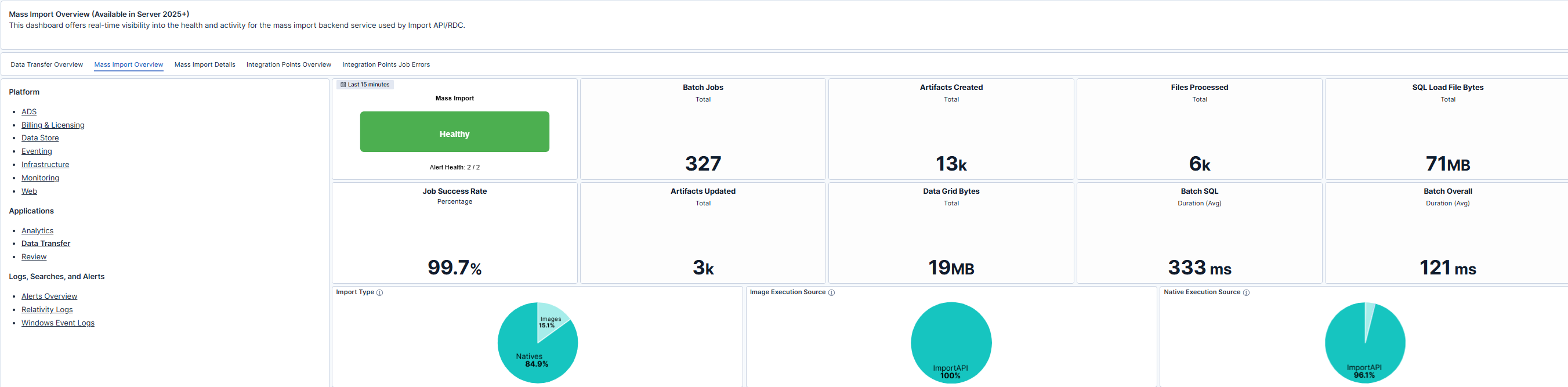
The dashboard summarizes Mass Import service health and operational metrics for the selected time range. Key indicators include:
Import type and execution source breakdowns provide additional visibility into workload distribution, helping administrators understand how imports are being executed across APIs and native processes.
| Use Case | Description |
|---|---|
| Troubleshoot slow imports | Identify elevated SQL duration or overall batch duration that may indicate database or infrastructure bottlenecks. |
| Validate post-installation or upgrade health | Confirm Mass Import services report healthy status and maintain expected success rates after deployment changes. |
| Monitor ingestion throughput | Track artifacts created, files processed, and load file volume to evaluate processing efficiency. |
| Plan capacity and scaling | Review long-term job volume and duration trends to determine resource requirements and optimize performance. |
