


Feedback

This dashboard provides a consolidated view of the operational state of the Application Deployment System (ADS). It helps relativity administrators quickly assess overall ADS health, review agent and Kepler service performance, and understand the scale of active ADS components in the environment. The metrics support day-to-day monitoring as well as validation after deployments or configuration changes.
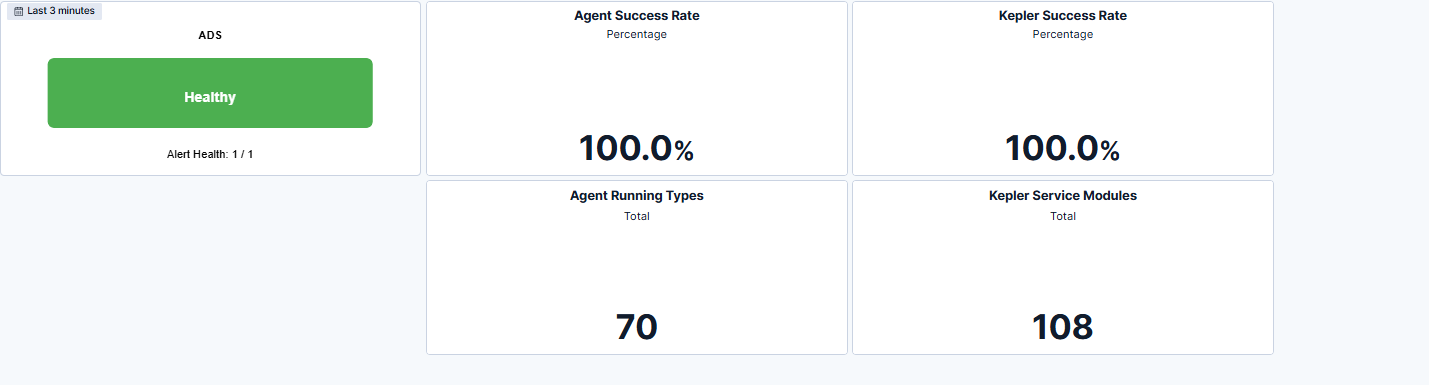
The summary section presents the current ADS health state, including alert status and overall system condition. This section allows users to validate the readiness of ADS at a glance, ensuring that deployment and extensibility components are stable and operational. Agent Success Metrics displays the success rate of ADS-related agents, providing insight into the reliability of automated processes running within the environment. A consistently high percentage indicates stable and successful agent execution. Administrators can use this metric to identify when agent performance begins to degrade or when failures may signal underlying system issues.
| Use Case | Description |
|---|---|
| Validate ADS health | Confirm that ADS components are running normally after installation, upgrades, or configuration updates. |
| Monitor operational performance | Track agent and Kepler success rates to ensure stable processing and early detection of performance issues. |
| Troubleshoot ADS-related failures | Use success metrics and component counts to pinpoint failing processes or unavailable modules. |
| Verify deployment and extensibility setup | Ensure the correct number of agents and service modules are active when enabling new workflows or integrations. |
