


Feedback

This recipe provides steps to search for dates within Relativity using a filter, a saved search, or a dtSearch.
Applicable to all versions of Relativity.
You can search for dates in Relativity using three different methods:
To search for a date using a field filter, perform the following steps:
The following table lists examples of valid date and number searches, as well as the expected result set.
| Valid search strings | Return items where... |
|---|---|
| >= 7/24/2008 | [FIELD VALUE] >= '7/24/2008' |
| <= 7/24/2008 | [FIELD VALUE] <'7/25/2008' |
| = 7/24/2008 | ([FIELD VALUE] > '7/23/2008') AND ([FIELD VALUE] <'7/25/2008) |
| >= 07/27/2008 1:23 PM | [FIELD VALUE] >= '07/27/2008 1:23 PM' |
| <= 07/27/2008 1:23 PM | [FIELD VALUE] <= '07/27/2008 1:23 PM' |
| = 07/27/2008 1:23 pm | [FIELD VALUE] = '07/27/2008 1:23 PM' |
| 7/24/2008 BETWEEN 8/24/2008 | ([FIELD VALUE] >= '7/24/2008') AND ([FIELD VALUE] <= '8/24/2008') |
| 7/24/2008 1:23 PM BETWEEN 8/24/2008 3:45 PM | ([FIELD VALUE] >= '7/24/2008 1:23 PM') AND ([FIELD VALUE] <= '8/24/2008 3:45 PM') |
| 07/27/2008 | ([FIELD VALUE] >= '07/27/2008') AND ([FIELD VALUE] < '7/28/2008') |
| >= 100 | [FIELD VALUE] >= '100' |
| <= 100 | [FIELD VALUE] <= '100' |
| = 100 | [FIELD VALUE] = '100' |
The following table includes examples of invalid data and number search strings.
| Invalid search strings | Invalid reason |
|---|---|
| > 7/24/2008 | You must use the equal sign with the greater than operator (as in >=). |
| < 7/24/2008 | You must use the equal sign with the less than operator (as in <=). |
| >= 0/24/2008 | The search string includes the value 0 for the month. |
| = 0/24/2008 | The search string includes the value 0 for the month. |
| 0/24/2008 BETWEEN 8/24/2008 | The search string includes the value 0 for the month in the starting date. |
| 7/24/2008 BETWEEN 0/24/2008 | The search string includes the value 0 for the month in the ending date. |
To search for a date in Relativity using a saved search, perform the following steps:
You can set additional conditions to search for non-consecutive dates, including non-consecutive date ranges.
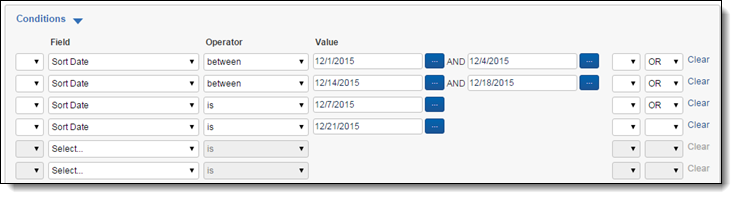
Some cases require you to search for dates contained within the text of a document. Because dates can appear in various formats, the auto-recognize feature in dtSearch is useful.
To use this feature, build a new dtSearch index with Auto-recognize date, email, and credit card numbers set to Yes. Once the index is complete and active, you can search for dates within the text of a document.
The auto-recognize feature searches for strings that appear to be dates. It uses English-language months, including common abbreviations, and numerical formats. For example, dtSearch recognizes the following date formats:
It doesn't recognize DD/MM/YYYY format.
Note the following date and date range search strings:

