


Feedback

This dashboard provides visibility into the operational status of Windows services running across your Relativity servers. It helps ensure that all required services are active and functioning as expected, enabling smooth platform operation and quick detection of service-level issues. This dashboard is useful for monitoring service health across multiple hosts and identifying any stopped or failed services that could affect Relativity performance.
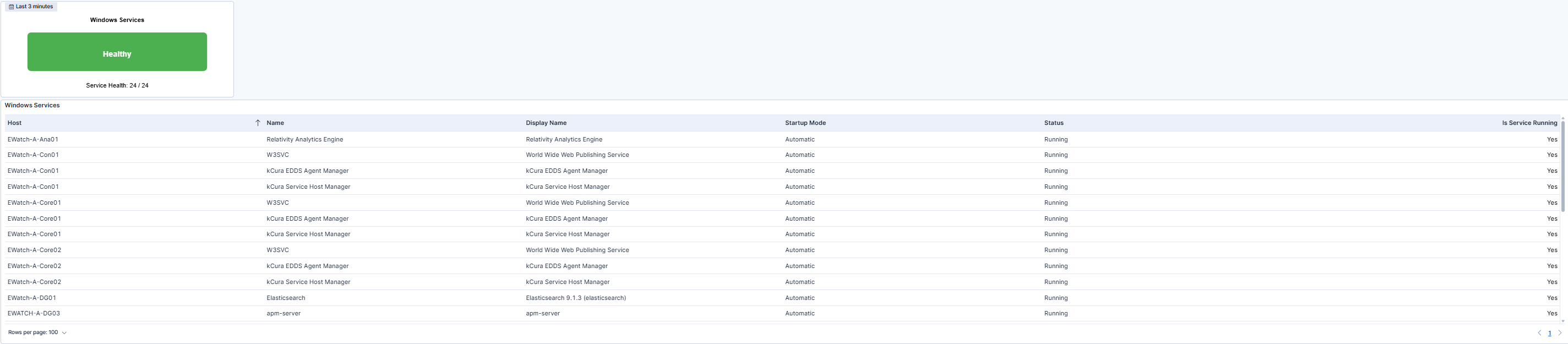
This dashboard provides the overall health of Windows services across monitored Relativity servers. At the top, the Health indicator displays the current status of all tracked services. When the indicator shows Healthy, it means all monitored services are running and no alerts are active. If the indicator turns Unhealthy (red), one or more Windows services have stopped or failed to start. The value below the indicator shows how many services are currently running compared to the total being monitored.
The accompanying table provides detailed service-level insights, listing the Host, Service Name, Display Name, Startup Mode, Status, and Is Service Running fields. This information helps quickly identify which services are operational and which ones are not. Any service with a No status in the "Is Service Running" column is highlighted in red to draw immediate attention.
| Use Case | Description |
|---|---|
| Monitor critical Windows services | Confirm that all critical Windows services required for Relativity are running and healthy across servers. |
| Detect service issues | Quickly identify stopped or failed services using the red health indicator and status table. |
| Enable proactive maintenance | Detect early warning signs of service-related issues to address them before they affect system performance. |
