


Feedback

This dashboard provides an in-depth view of all active RabbitMQ queues within your Relativity environment. It allows Relativity administrators monitor message flow and processing activity at the queue level - including how many messages have been published, delivered, acknowledged, or remain unacknowledged. It also shows the number of consumers connected to each queue. By reviewing these details, relativity administrators can ensure that message queues are functioning efficiently and that all messages are successfully consumed by the appropriate Relativity services. This visibility is critical for identifying message backlogs, unprocessed queues, or delivery delays that could affect system performance or workflow execution.This dashboard complements the RabbitMQ Overview Detail Dashboard by providing deeper queue-level insights necessary for troubleshooting and fine-tuning message processing behavior.
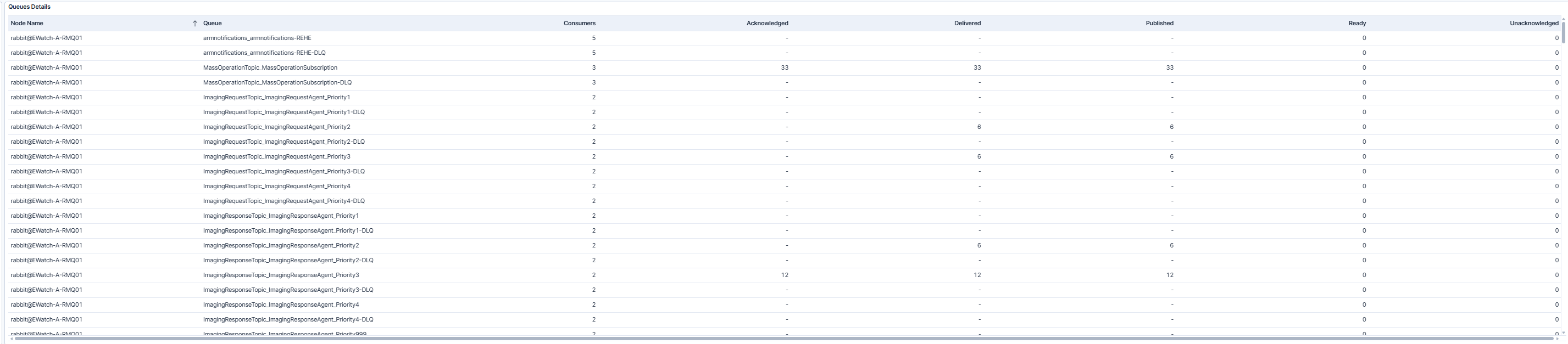
The dashboard displays the RabbitMQ Queue Detail view, listing all RabbitMQ queues by node name. For each queue, it shows key message flow metrics, including:
Relativity administrators can use this information to quickly detect queues with high unacknowledged message counts, stalled deliveries, or inactive consumers. A healthy queue typically shows consistent acknowledgment and low unacknowledged message counts.
| Use Case | Description |
|---|---|
| Troubleshooting Message Processing | Use this dashboard to identify queues where messages are not being consumed or acknowledged as expected. High numbers of unacknowledged messages can indicate an issue with the consumer service or message delivery bottlenecks. |
| Monitoring Queue Load | Track queues with high message volumes or delivery rates to evaluate whether RabbitMQ resources are appropriately scaled. Reviewing delivery and publish counts helps detect unusual spikes or slowdowns in message processing. |
| Analyzing Consumer Distribution | Review the number of consumers per queue to ensure workload distribution across nodes. Uneven consumer counts may point to configuration gaps or potential failover issues that need attention. |
