This site is currently undergoing maintenance, so instances of "RelativityOne" may still be present. You may also experience 404 errors, search disruptions, and temporary style changes.

Last date modified: 2026-Sep-17

Search terms reports

Search terms reports provide the ability to identify documents containing specific keywords or terms. You can enter multiple terms and generate a report listing the number of hits for each term in a document. You can also select an option to create a multiple object field for the search terms report to use in your persistent highlight sets. When you select a search terms report for use with a persistent highlight set, the report determines which terms or phrases to highlight in the documents through the Review Interface.

For information on how to calculate and store the number of terms in a Search Terms Reports (STR) that hit on a document, see Search terms report hit count.
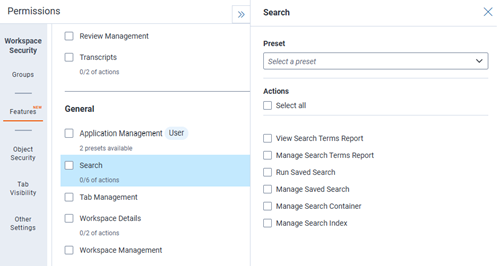
Permissions

This feature supports feature permission actions. Each action grants access to a specific task within the feature. You can grant groups access to individual actions, allowing them to perform only the tasks they need. To grant access to the entire feature, select all of its actions. Manage feature actions on the Features tab in a group's workspace permissions. For instructions, see Setting workspace permissions. For more information about feature permissions, see Feature permissions.

Workspace level Features tab in Permissions for Search

Feedback