Permissions
This feature supports feature permission actions. Each action grants access to a specific task within the feature. You can grant groups access to individual actions, allowing them to perform only the tasks they need. To grant access to the entire feature, select all of its actions. Manage feature actions on the Features tab in a group's workspace permissions. For instructions, see
Setting workspace permissions. For more information about feature permissions, see
Feature permissions.
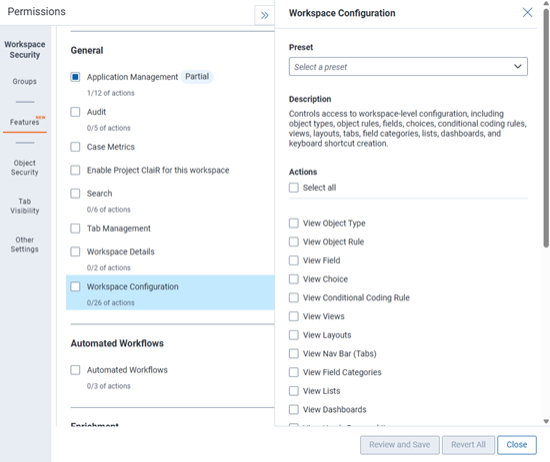
On the Features tab of Workspace Security, locate Workspace Configuration. Open the details panel, then configure the following actions to manage workspace-level Conditional Coding Rule permissions.
- View Conditional Coding Rule—selecting this action allows users in the group to access the Conditional Coding Rules tab and view the conditional coding rules in the workspace.
- Manage Conditional Coding Rule—selecting this action allows users in the group to access the Conditional Coding Rules tab and to view, create, edit, and delete conditional coding rules in the workspace. They can also set security on individual rules.
- The Conditional Coding Rules application must be installed in the workspace for permissions to apply.
- The Manage Conditional Coding Rule permission lets users view and select fields and choices when building a rule. It does not provide access to the Fields or Choices tabs or allow users to modify them.


